Zapier Fake Chat Video Integration: Automate Simulated Conversations
Discover how Zapier fake chat video integration automates chat simulations in videos, enhancing engagement and consistency for creators and businesses.

Estimated reading time: 8 minutes
Key Takeaways
- Zapier enables no-code automation linking chat outputs to video workflows.
- Fake chat video integration embeds scripted conversations into videos for higher engagement.
- A clear process uses webhooks, data formatting, and video editing APIs to automate overlays.
- Main benefits include consistent messaging, reduced manual work, and time savings.
- Future trends point to AI-driven chat generation and real-time personalized experiences.
Table of Contents
- Section 1: Understanding Zapier as an Automation Tool
- Section 2: Explaining Fake Chat Video Integration
- Section 3: How Zapier Facilitates Fake Chat Video Integration
- Subsection A: Tools and Software Required
- Subsection B: Step-by-Step Integration Guide
- Section 4: Benefits and Use Cases
- Section 5: Best Practices and Troubleshooting
- Section 6: Future Trends and Considerations
- Conclusion
- FAQ
Section 1: Understanding Zapier as an Automation Tool
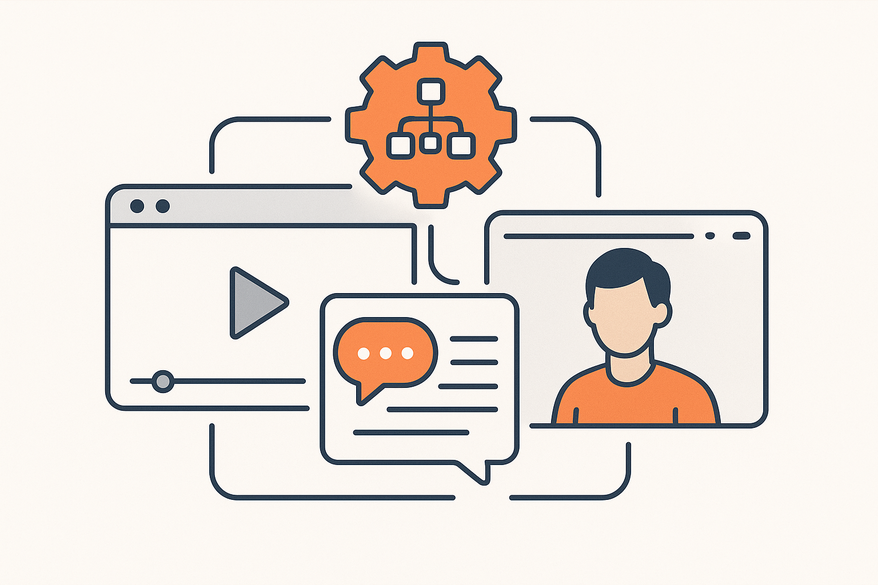
Zapier is the hub for creating automated workflows—called Zaps—that link apps without code. A Zap consists of a trigger (an event) and one or more actions (tasks).
- No-code interface and visual builder for easy setup
- Support for thousands of apps across CRM, email, databases, and video tools
- Multi-step Zaps, conditional logic (Paths), and formatting utilities
By integrating Zapier fake chat video integration, teams can automate the flow of chat data into editing pipelines without writing scripts.
Section 2: Explaining Fake Chat Video Integration
Fake chat refers to simulated chat conversations—either pre-recorded or algorithmically generated—rather than real-time user exchanges. In videos, fake chat appears as chat bubble overlays or animated message reveals synchronized with audio or screen recordings.
Common Use Cases:
- Marketing Demos: Simulate chatbot flows in a SaaS product video
- Tutorials: Step-by-step guidance via a chat interface
- Training Modules: Role-play customer support scenarios
- Engagement Videos: Explainers with an interactive messaging feel
Advantages include increased engagement, clearer communication of complex features, and control over narrative pacing. By combining fake chat with Zapier, creators automate the insertion of these overlays, ensuring error-free timing and a polished final product.
Section 3: How Zapier Facilitates Fake Chat Video Integration
Subsection A: Tools and Software Required
- Chat Simulation Platforms: Botpress, custom scripts, or chatbot builders to script dialogues
- Video Editing Tools: Adobe Premiere Pro, Final Cut Pro, or online editors for overlaying chat bubbles
- Zapier: The automation hub that connects chat simulation outputs to video workflows
Subsection B: Step-by-Step Integration Guide
- Generate Chat Data
– Script your conversation in a chatbot builder (e.g., Botpress) and export the chat log (user ID, timestamp, message). - Trigger Automation in Zapier
– Create a Zap with a Webhook “Catch Hook” trigger. Paste the Zapier webhook URL into your chat tool’s webhook settings. - Process and Format Data
– Add Formatter by Zapier steps to clean timestamps, convert chat logs to JSON or spreadsheet rows. - Integrate with Video Editing
– Send formatted data to Google Sheets or a video-editing API (e.g., Adobe ExtendScript).
– Use the sheet to auto-generate subtitles or shape layers representing chat bubbles in your editor. - Review, Render, and Publish
– Verify overlay timing matches the script, export the final video, and upload to your platform.
Each of these steps leverages Zapier fake chat video integration to streamline the workflow from chat script to finished video. For additional automation workflows, see our guide on automating fake chat video generation.
Section 4: Benefits and Use Cases
Benefits of Zapier Fake Chat Video Integration:
- Marketers: Produce product demos before your chatbot goes live
- Educators/Trainers: Create repeatable, scenario-based learning modules
- Businesses: Maintain brand consistency, reduce manual editing, and speed up content delivery
Use Case Example:
A SaaS company automates simulated customer support chats in Botpress. Zapier pulls the chats into Adobe Premiere Pro, creating onboarding videos that cut training time by 30%.
Learn advanced editing techniques in our Ultimate Chat Video Editing Tips for Engaging Conversation-Driven Content.
Section 5: Best Practices and Troubleshooting
Best Practices
- Script Realism: Base chat scripts on actual user queries to boost authenticity.
- Data Consistency: Use uniform variable names across your chatbot and Zap to prevent mapping errors.
- Workflow Testing: Run Zaps end-to-end before full production to catch issues early.
Common Challenges & Solutions
- Data Formatting Errors: Use Formatter by Zapier to normalize dates and text.
- Missed Webhook Triggers: Add error-logging steps or email alerts when Zaps fail.
- Sync Issues in Video Editing: Adjust timecodes manually or use frame-accurate scripting in your editor.
Additional considerations include accessibility, localization, and error monitoring to ensure reliable outputs.
Section 6: Future Trends and Considerations
The future of Zapier fake chat video integration is shaped by emerging AI and deeper platform ecosystems:
- AI-Driven Chat: Generative models will create context-aware chat logs on the fly.
- Expanded App Directory: Zapier will connect with analytics, real-time rendering engines, and VR/AR platforms.
- Real-Time Personalization: Combine user-data triggers with dynamic chat overlays for customized viewing experiences.
Conclusion
Zapier fake chat video integration automates the embedding of simulated chat conversations into your videos, saving time and boosting engagement. By uniting chat simulation platforms with video editing tools through Zapier, you achieve scalable, consistent, and interactive content. Ready to try it? Set up your first Zap for fake chat video integration today, and share your results or questions in the comments below.
FAQ
- What is fake chat video integration?
Fake chat video integration embeds pre-scripted or generated chat conversations into videos, simulating real user interactions. - Which tools do I need?
You need a chat simulation platform, a video editing tool, and Zapier to connect them. - How do I troubleshoot webhook triggers?
Enable error-logging steps in your Zap and add email alerts to catch failures early. - Can I use AI to generate chat scripts?
Yes, AI-driven chat models can create context-aware dialogues that you can import via webhooks. - Where can I learn more?
Check out the resources and guides linked throughout this post for deeper dives.