AI Video Color Correction: Revolutionizing Post-Production Workflows
Explore how AI video color correction is transforming post-production by automating technical tasks, ensuring consistency, and offering accessible pro-level results.

Estimated reading time: 6 minutes
Key Takeaways
- Automated efficiency: AI streamlines color, exposure, and consistency tasks, cutting workflows by up to 40%.
- Consistent results: Ensures uniform color grading across multi-camera shoots and large projects.
- Pro-level access: Democratizes advanced color workflows for beginners and professionals alike.
- Seamless integration: Works with major NLEs like DaVinci Resolve, Adobe Premiere Pro, and more.
Table of Contents
- Introduction
- Section 1: Understanding AI Video Color Correction
- Section 2: Exploring Auto Color Grading for Video Clips
- Section 3: Delving into AI Clip Color Enhancer
- Section 4: Integration and Workflow
- Section 5: Future Trends and Innovations
- Conclusion
- FAQ
Introduction
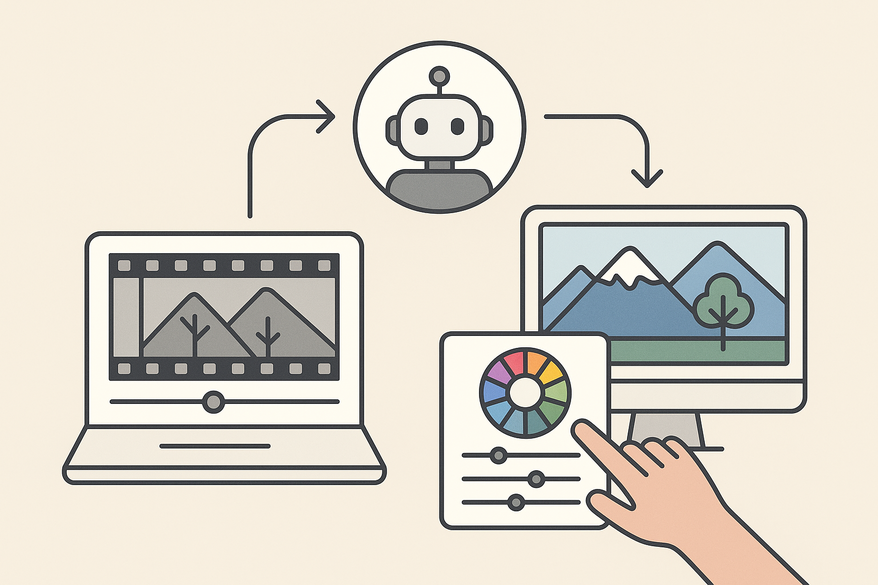
AI video color correction is *transforming* the editing landscape by automating color, exposure, and consistency tasks. This intelligent process uses machine-learning algorithms to analyze and adjust brightness, contrast, saturation, and hue across entire footage without manual frame-by-frame intervention, as illustrated in AI Puts Color Correctors Out of Work and AI Color Correction 2024 Video Editing Guide.

By leveraging AI, production time can be slashed by up to 40%, consistency is guaranteed across large projects, and pro-level color grading becomes accessible to all. For a broader look at how AI is automating editing tasks—from intelligent clipping to color tweaks—explore AI Clip Editor App: Revolutionizing Video Editing Automation and How AI Video Clipping Works.
Tools like Vidulk - AI Video Clipping App integrate advanced on-device AI to detect and apply optimal color corrections during auto-clipping, streamlining your entire post-production workflow.
Section 1: Understanding AI Video Color Correction
Technology Overview
At its core, AI color correction relies on neural networks to inspect each frame for brightness, contrast, saturation, and hue. Models like DaVinci Resolve’s Neural Engine and Colourlab AI are trained on millions of images—they detect objects, skin tones, textures, and lighting to apply automatic adjustments, as seen in AI-assisted Color Grading: Yay or Nay?.
Algorithm Steps:
1. Scene detection – Identify shot boundaries and lighting shifts
2. Color profile matching – Compare frames to reference LUTs or photographer presets
3. Parameter adjustment – Auto-apply exposure, contrast, temperature, and color balance fixes
4. Output preview & user review – Display before/after for quick tweaks
Benefits vs Traditional Methods
- Speed: Processes footage up to 40% faster than manual grading (AI Color Correction 2024 Video Editing Guide).
- Consistency: Delivers identical color balance across multi-camera shoots (AI-assisted Color Grading: Yay or Nay?).
- Accessibility: Brings pro-grade color workflows to beginners (AI Color Correction 2024 Video Editing Guide).
- Batch processing: Corrects multiple clips at once for large-scale projects.
Real-World Use Cases
- Film & TV: Fix under/overexposed scenes and unify white balance across diverse sets (Color Grading vs Color Correction).
- Online media & YouTube: Achieve quick turnarounds for vlogs and tutorials.
- Corporate & Advertising: Maintain brand-safe color standards across all campaign assets (AI Puts Color Correctors Out of Work).
Section 2: Exploring Auto Color Grading for Video Clips
Auto color grading automatically applies creative looks and stylistic LUTs. AI algorithms analyze mood, contrast, and color dynamics in each frame to produce cinematic styles without manual tweaking (AI Puts Color Correctors Out of Work).
How It Works:
1. Analyze scene color dynamics (contrast, midtones, highlights)
2. Match to preset looks or create custom styles via neural style transfer
3. Apply global tone mapping, split toning, and color curves
Manual vs Auto Comparison:
• Speed: Manual slider-by-slider vs Auto instant AI suggestion
• Consistency: Manual results vary per clip vs Auto unified creative look
• Accessibility: Manual needs expert vs Auto beginner-friendly with tweak options
• Creative control: Manual full artistic input vs Auto guided presets
Drawback: AI may overlook subtle emotional tones that require human judgment (AI-assisted Color Grading: Yay or Nay?).
Section 3: Delving into AI Clip Color Enhancer
An AI clip color enhancer refines individual segments by balancing exposure, white balance, contrast, and saturation for optimal aesthetics (Color Grading vs Color Correction).
- Exposure balancing across consecutive clips to avoid jarring transitions
- White balance correction through color temperature analysis (AI Color Correction 2024 Video Editing Guide)
- Skin tone mapping via semantic segmentation
- Color coherence: match histograms between clips for seamless cuts
Section 4: Integration and Workflow
End-to-End Process:
- Initial AI correction to fix technical issues on all footage
- Auto color grading for a consistent creative look
- AI clip color enhancer for fine-tuning individual shots
Tools & Software Integration:
DaVinci Resolve Neural Engine, Adobe Premiere Pro Lumetri Color, Colourlab AI, Imagen Video—all support plug-ins or built-in AI features for standard formats (AI Color Correction 2024 Video Editing Guide, How to Get Perfect AI Video Color Correction with Imagen Video).
Section 5: Future Trends and Innovations
- Real-time on-interface adjustments: live AI corrections directly in the NLE timeline (AI Color Correction 2024 Video Editing Guide).
- Intelligent scene detection: context-aware grading for indoor/outdoor, day/night.
- Advanced skin tone management with semantic AI.
- Expanded creative control via rapid multi-style previews (How to Get Perfect AI Video Color Correction with Imagen Video).
- Narrowing the gap between automated consistency and human-led artistic vision (AI Puts Color Correctors Out of Work).
Conclusion
AI video color correction automates technical tasks, auto color grading injects creative style, and AI clip enhancers polish individual shots. Together, they save time, deliver consistent results, and democratize pro-level color workflows for editors of all skill levels. Explore these AI features today to elevate your next project’s visual impact and streamline your post-production pipeline.
FAQ
What is AI video color correction?
AI video color correction uses machine-learning algorithms to automatically adjust brightness, contrast, saturation, and hue across every frame—eliminating manual, frame-by-frame edits.
How much time can AI save?
On average, AI color correction reduces post-production time by up to 40%, especially in large projects with batch processing.
Are AI-driven results as reliable as manual grading?
While AI provides consistent and professional results, human judgment may still be needed for subtle artistic nuances or emotional tones.
Which tools support AI color correction?
Popular options include DaVinci Resolve Neural Engine, Adobe Premiere Pro Lumetri Color, Colourlab AI, and Imagen Video, among others.
Can beginners use AI-based color correction?
Absolutely—AI-driven workflows are user-friendly and offer guided presets, making pro-level color grading accessible to newcomers.