
How to Make a Text Story Video: Step-by-Step Guide
Learn how to make a text story video for TikTok, Reels, or YouTube Shorts. Step-by-step guide for fake chat, iMessage, and WhatsApp chat videos.

Estimated reading time: 12 min
Key Takeaways
- Learn how to make a text story video in the style of fake iMessage, WhatsApp, or chat stories.
- Step-by-step workflow: scripting, visual creation, editing, sound, and export.
- Get tips for scripting short, viral stories and pacing messages for retention.
- Discover tools like Vidulk and other fake text message video makers.
- Format your chat story video for TikTok, Instagram Reels, or YouTube Shorts.
Want to learn how to make a text story video that goes viral? Whether you love those fake iMessage stories, dramatic WhatsApp chats, or Reddit story videos, chat story formats dominate TikTok and Reels. In this complete guide, you'll master every step: scripting compelling fake chats, making messages appear one by one, adding sound, and exporting vertical videos that pop. We'll cover top tools—including AI apps like Vidulk—so you can create captivating fake text message videos and chat story clips in minutes.
Step 1: Plan Your Text Story Video Format
First, decide which chat style fits your story. Each format has a unique look and vibe:
- Fake iMessage Video: Mimics Apple's iMessage interface—blue/gray bubbles, familiar notification sounds.
- Fake WhatsApp Chat Video: Green and white theme, classic WhatsApp layout, great for international stories.
- Chat Story Video: Could use generic texting app visuals, or custom chat backgrounds for a Reddit story video feel.
- Reddit Story Video: Often combines text overlays and avatars, with narration or AI voiceover.
Consider your audience and platform. iMessage and WhatsApp formats perform well on TikTok and Reels due to instant recognition. You can use dedicated fake text message video makers or video editors with chat templates. For a detailed walkthrough on creating vertical chat conversation videos, see How to Make Vertical Chat Conversation Videos: The Ultimate Guide.
Step 2: Write a Short Hook and Script
Great chat story videos start with a killer hook. The first 2-3 messages must grab attention—think drama, mystery, or humor. Then, script the chat so each message reveals a new twist or punchline.
- Keep it short: aim for 15-60 seconds total.
- Write in a conversational style—like real texting.
- Break up info into separate messages for pacing.
- Use a cliffhanger or surprise ending to boost shares.
Not sure where to start? Try Vidulk’s Free Hook Generator for instant story starters tailored to your topic.
Step 3: Choose Visuals and Backgrounds
Now, select the visual style for your chat video:
- App Screenshots: Use real or generated iMessage/WhatsApp backgrounds.
- Stock Clips & Animated Visuals: Layer chat bubbles over moving backgrounds for a dynamic look.
- Avatars & Profile Pics: Add icons for each character—use AI image tools like Vidulk’s AI Studio for custom avatars.
Most fake text message video makers offer built-in templates for iMessage, WhatsApp, or other texting apps. You can also customize backgrounds for a unique Reddit story video style. If you're interested in adapting Reddit stories into engaging video content, check out How to Make a Viral Reddit Story Video and Chat Story Clips.
Step 4: Add and Time Chat Messages
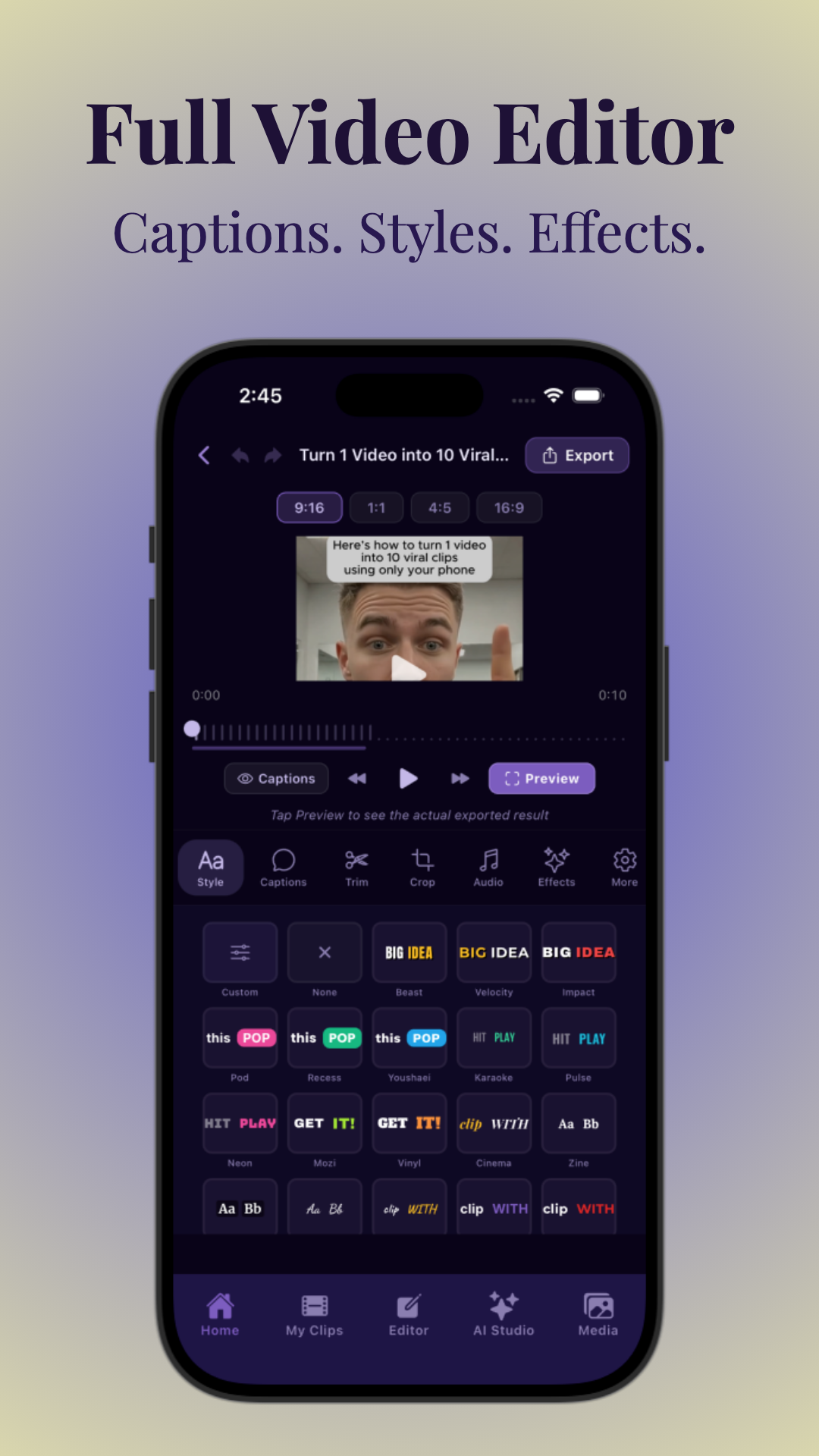
To create a real chat feel, messages should appear one by one—timed to the beat of your story. Here’s how:
- Use the app’s timeline to place each message sequentially.
- Set durations: 0.5–2 seconds per message for fast, engaging pacing.
- Stagger replies: allow slight delays to mimic natural texting.
- For advanced control, use an AI chat video generator or fake text message video maker that lets you animate each bubble’s entrance.
With apps like Vidulk, you can drag and drop captions, adjust timings, and preview the flow for TikTok or Reels. For more on automating viral edits, check out AI Clip Generator: Transform Long Videos Into Viral Shorts.
Step 5: Add Sound Effects, Music, and Voiceover
Sound is crucial for realism and retention. Here’s how to make your fake chat story video pop:
- Message Sound Effects: Add iMessage or WhatsApp notification sounds as each bubble appears.
- Music: Choose background tracks that match your story’s mood. Keep music low to avoid overpowering dialogue.
- Voiceover: Narrate the chat or use text-to-speech for each character. This is popular in Reddit story videos and AI chat video generators.
- Most editing apps let you layer audio, trim clips, and sync effects with message timing.
Pro tip: Add a subtle typing sound before each message for extra realism!
Step 6: Format for TikTok, Reels, or Shorts
Text story videos work best in vertical 9:16 format—perfect for TikTok, Instagram Reels, and YouTube Shorts. Make sure:
- Export at 1080x1920 resolution (or higher).
- Keep chat bubbles in the center third of the screen.
- Use large, readable fonts and high-contrast colors.
- Test on your phone before publishing to check visibility and pacing.
Many fake text message video makers and AI chat video generators offer presets for these platforms. For a comprehensive guide on making vertical chat videos, see How to Make Vertical Chat Conversation Videos: The Ultimate Guide.
Step 7: Export, Publish, and Optimize
Once your chat story video is ready:
- Export in MP4 format, vertical orientation, and the highest quality your app allows.
- Add a catchy title, engaging caption, and relevant hashtags (e.g., #textstory, #chatdrama, #imessagevideo).
- Include a call to action (ask viewers to comment, like, or share).
- For AI-enhanced videos or to batch create clips, see Fake Chat Video: How to Easily Create Viral Clips with AI.
Ready to go viral? Share your video on TikTok, Instagram Reels, and YouTube Shorts—or use Vidulk to instantly clip and repurpose content from long podcasts or interviews.
Tips & Common Mistakes
- Don’t overcrowd the screen: Stick to 1–2 lines per message bubble for readability.
- Check pacing: Too slow loses attention, too fast confuses viewers. Preview and adjust timings.
- Use real-sounding names and avatars: Makes the chat feel authentic.
- Avoid copyright music: Use royalty-free tracks or app-provided sounds.
- Edit for virality: Trim any dull moments, use jump cuts if needed, and always lead with your hook.
For more on editing and pacing, see How to Make AI Video Clips: A Step-by-Step Guide.
Conclusion
Now you know how to make a text story video from start to finish! Whether it’s a fake iMessage video, WhatsApp chat drama, or Reddit story adaptation, chat story videos are among the most bingeable formats for TikTok and Reels. With the right tools—like Vidulk—and a viral script, you can turn any idea or long-form content into engaging, shareable chat videos. Experiment, have fun, and don’t forget to optimize for your platform of choice!
FAQ
- How do I make a fake text story video?
Start by scripting a short, dramatic chat, then use a fake text message video maker or video editor with chat templates. Add messages one by one, layer in sounds, and export vertically for TikTok or Reels. For a comprehensive step-by-step guide, see How to Make Fake Text Message Videos: The Ultimate Guide. - What app can I use to create texting story videos?
Popular apps include Vidulk (for fast, AI-powered editing), TextingStory, and other fake WhatsApp/iMessage video makers. Vidulk also lets you turn long videos into viral chat clips automatically. - How long should a text story video be?
Ideal length is 15–60 seconds for TikTok, Reels, or Shorts. Keep it concise for maximum retention and sharing. - How do I add message sound effects and timing to a text video?
Use your editor’s timeline to time each message bubble. Add notification and typing sounds synced to each new message for realism. - What format should a text story video be for TikTok or Reels?
Export in vertical (9:16) format, 1080x1920 resolution, and MP4 file type for best results. - How do you make text messages appear one by one in a video?
Most apps let you animate bubbles on a timeline. Adjust the timing so each message appears sequentially, mimicking a real chat.



