How to Use an AI Reel Clip Generator to Create Short Videos from Long Content
Effortlessly convert long videos into short clips using an AI reel clip generator. Streamline content creation with automated tools for engaging social media reels.

Estimated reading time: 7 minutes
Key Takeaways
- Use AI-driven tools to quickly extract and repurpose highlights from long videos into 9:16 vertical shorts.
- AI processes include transcription, natural language processing, and automated assembly for speed and consistency.
- Step-by-step workflow: upload video, set parameters, review clips, and export for social platforms.
- Key benefits include time savings, cost reduction, consistent branding, and high-quality output.
- Popular tools: StreamYard AI Clips, Opus Clip, and VEED offer varied features and pricing models.
Table of Contents
- Introduction
- Understanding the Technology of an AI Reel Clip Generator
- How Reel Clip Maker AI Works
- Step-by-Step Guide to Generate Reels from Long Video
- Key Benefits and Features
- Use Cases and Examples
- Selecting the Right Tool
- Final Thoughts
AI reel clip generator tools are transforming how creators repurpose lengthy recordings—podcasts, webinars, livestreams—into social-ready short-form videos. In minutes, you can convert hours-long content into attention-grabbing reels without manual scrubbing. This guide explains how to use a reel clip maker AI to generate reels from long video sources, step by step. By the end, you’ll have a fast, actionable workflow to start creating vertical, captioned shorts today.
For audio-first creators, see our guide on AI Podcast Clip Generator: Transform Long-Form Audio into Viral Clips.
Understanding the Technology of an AI Reel Clip Generator
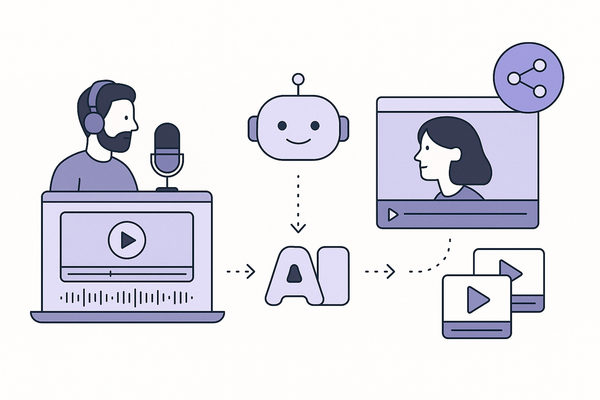
An AI reel clip generator is an AI-powered system that automates highlight extraction and formatting for platforms like Instagram Reels, TikTok, and YouTube Shorts.
- Analysis: Uses machine learning and natural language processing (NLP) to scan long-form videos.
- Detection: Auto-identifies high-engagement moments—key phrases, pauses, reactions.
- Formatting: Outputs clips in a 9:16 vertical aspect ratio with captions and branding.
Compared to manual editing—scrubbing, cropping, captioning—an AI tool delivers dozens of ready-to-publish clips in minutes instead of days. Experienced teams report cutting weekly editing time from 12 hours to under 2 hours.
Source: StreamYard AI Clips vs. Opus Veed
How Reel Clip Maker AI Works
Understanding the core processes behind a reel clip maker AI reveals why it’s so efficient:
- Transcription for Speech Analysis: Converts speech to time-stamped text via automatic speech recognition (ASR).
- Highlight Detection via NLP: Scans transcripts for engagement cues—emphasis, laughter, question tones, and hooks.
- Automated Assembly: Crops to vertical 9:16, centers speakers, syncs captions, and adds titles or overlays.
Technical note: Live voice triggers (e.g., “Clip that”) can mark segments in real time. Final clips are 15–30 seconds of optimized pacing.
Step-by-Step Guide to Generate Reels from Long Video
Follow these steps to turn a multi-hour recording into scroll-stopping shorts:
- Upload Your Long-Form Video: MP4, MOV, MKV (up to 6 hours) from local library, Dropbox, Google Drive, or live capture.
- Set Clip Parameters: Choose durations (15, 30, custom), themes or tags, and optional voice markers.
- Generate and Review Clips: Click “Generate clips” to run transcription, detection, and assembly. Refine trims, reframe shots, and edit captions.
Pro tip: Batch export to Instagram, TikTok, or YouTube Shorts and schedule overnight processing for a ready-to-go content calendar.
Creators can also explore Vidulk, a mobile app that automates this workflow.
Source: StreamYard AI Clips vs. Opus Veed
Key Benefits and Features
Leveraging a reel clip maker AI yields measurable gains:
- Time Savings: Up to 75% faster than manual editing. AI Video Creation Advantages
- Cost Reduction: Cut post-production costs by 50–80%.
- Consistent Branding: Apply uniform captions, colors, and fonts via templates.
- High-Quality Output: Up to 4K resolution, speaker-aware framing.
Use Cases and Examples
- Yoga Studio Demo Reels: One-hour sessions become 30-second posture highlights with 40% higher ad click-through rates. Source: StreamYard AI Clips vs. Opus Veed
- Podcast Highlight Clips: Extracted quotes double social engagement and drive 20% monthly follower growth.
- Marketing Teams with Opus Clip: 300% boost in engagement and 75% cut in production time. Source: AI Video Tools for Marketing
Selecting the Right Tool
Evaluate your needs across integration, pricing, and usability:
- StreamYard AI Clips: In-app generation, live voice triggers, free 12 hours/month. Best for live streamers.
- Opus Clip: Deep auto-clipping, credit-based free tier. Ideal for multi-platform heavy users.
- VEED: Text-to-video add-ons, concept-to-reel workflows. Subscription plans for high-volume creators.
For a comprehensive comparison, check AI Video Clip Maker: Transform Long Videos to Short Clips Automatically.
Final Thoughts
An AI reel clip generator revolutionizes video repurposing by automating transcription, highlight detection, and vertical formatting—saving time, reducing costs, and boosting engagement. Ready to transform your content? Start experimenting with these AI-powered clip generators today!
FAQ
- What formats are supported? MP4, MOV, MKV, and common audio formats for audio-first tools.
- How long does processing take? Dozens of clips in under 10 minutes for a multi-hour video.
- Can I customize captions and branding? Yes—editable templates let you adjust fonts, colors, and logos.
- Are live voice markers mandatory? No—you can also type custom prompts or rely on automatic detection.
- Which tool offers the best free tier? StreamYard provides up to 12 hours of monthly processing at no charge.