AI Thumbnail A/B Testing Tool: Revolutionize Your Video Thumbnail Optimization AI
Automate your video thumbnail optimization with an AI thumbnail A/B testing tool for faster and better AI thumbnail performance testing results.

7 min read
Key Takeaways
- Accelerate thumbnail testing from days to hours with AI-driven automation.
- Optimize click-through rates using real-time metrics and 95% confidence winners.
- Scale effortlessly across unlimited videos and channels without manual uploads.
- Leverage machine learning predictions for pre-publish scoring and design insights.
Table of Contents
- Introduction
- What Is A/B Testing for Thumbnails?
- The Role of AI in Thumbnail Testing and Optimization
- Deep Dive: Features & Capabilities
- Enhancing Video Content: Video Thumbnail Optimization with AI
- Strategic Benefits to Marketers & Content Creators
- Conclusion & Actionable Insights
- FAQ
Video thumbnails act like book covers, driving 70–90% of video clicks. Manual A/B testing is slow: creators must upload variants, wait days for data, and make gut-based decisions.
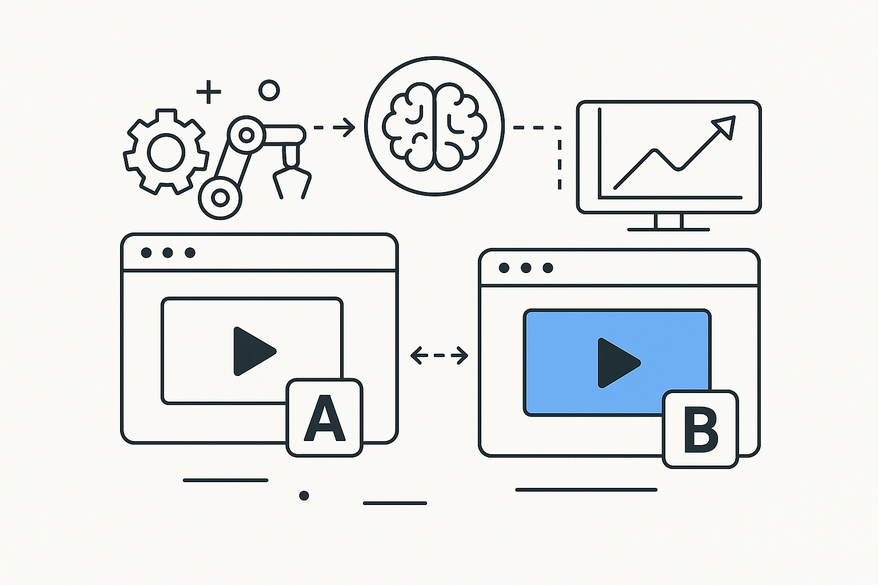
AI thumbnail A/B testing tools automate split tests, rotating variants via the YouTube API, collecting real-time metrics, and declaring winners within hours—dramatically increasing CTR without the manual grind.

In this post, you’ll learn how AI thumbnail split testing works, why it outperforms traditional methods, and how you can implement it to boost viewer engagement on every video.
What Is A/B Testing for Thumbnails?
Manual thumbnail split testing, also called split testing, involves showing two or more designs (A vs. B) to different viewer groups and measuring which gets more clicks or watch time. Traditional workflows include:
- Manual uploads: Upload up to three thumbnails, run each for days to weeks.
- Dashboard monitoring: Track CTR and impressions in YouTube Studio or third-party tools.
- Decision time: Pause the loser and keep the winner after sufficient data.
Drawbacks: Tests take over a week for statistical significance, scale is limited, and manual processes introduce bias. Automatic thumbnail split testing AI changes the game by rotating variants hourly, collecting real-time metrics, and auto-applying the winner at 95% confidence.
The Role of AI in Thumbnail Testing and Optimization
AI thumbnail A/B testing tools leverage machine learning models trained on millions of past thumbnails, analyzing features like contrast, facial expression, color balance, and text readability.
How an AI Thumbnail A/B Testing Tool Works:
- Pre-publish AI scoring
• Scores visual appeal, emotional impact, and text clarity before publishing.
• Provides real-time suggestions for improvement. - Automated live tests
• Rotates thumbnail variants via the YouTube API at set intervals.
• Ensures equal exposure for each design. - Real-time performance testing
• Collects CTR, impressions, and watch time continuously.
• Declares winners with 95%+ statistical confidence. - Instant deployment
• Automatically replaces all variants with the top performer.
• Eliminates manual uploads and dashboard checks.
Benefits: Tests complete in 2 hours instead of days, insights are data-driven, and you can scale across unlimited videos and channels.
For a deeper dive into AI-generated thumbnail strategies or to explore AI-driven thumbnail design, visit our resources.
Deep Dive: Features & Capabilities
A top AI thumbnail A/B testing tool streamlines the entire workflow with minimal user input.
Key Features
- Automated Variant Rotation
– Seamless YouTube API integration for hourly or daily swaps.
– Tracks impressions, CTR, and watch time per variant. - AI Prediction Scoring
– Pre-screens designs with machine learning models.
– Delivers composition and color enhancement tips. - Customizable Test Durations
– Choose windows from 2 hours up to 14 days.
– Built-in calculators ensure 95%+ confidence before declaring winners. - Integration with AI Generators
– Connect to StreamYard AI or Nano Banana for instant thumbnail creation.
– Use prompt-engineered templates to speed up design.
Automatic Thumbnail Split Testing AI Workflow
- Upload Variants – Add 3–5 thumbnail designs.
- Schedule Rotations – Set hourly or daily swap intervals.
- AI Image Analysis – Receive suggestions on brightness, contrast, and facial cues.
- Performance Tracking – Monitor CTR, impressions, and watch time in one dashboard.
- Report & Deploy – Auto-generate winner reports and apply the top variant.
Insights: Thumbnails with a bright smile can double CTR, high-contrast backgrounds boost clicks by 30%, and bold text increases view duration by up to 20%.
Enhancing Video Content: Video Thumbnail Optimization with AI
Optimizing your thumbnails involves tracking core metrics and following best practices:
Key Metrics Tracked
- Click-Through Rate (CTR)
- Impressions and total views
- Average watch time and retention
- Engagement signals (likes, comments, shares)
Best Practices
- Combine AI Generators & Split Testing: Use prompt-engineered generators, then test variants immediately.
- Optimize Packaging: Pair thumbnail tests with title experiments for holistic performance.
- Run Full Tests: Achieve 95% statistical significance; avoid mid-test changes.
- Iterate Continuously: Refresh thumbnail libraries weekly to capture trending styles.
Learn more about using AI-powered designers for social media previews to extend your reach.
Strategic Benefits to Marketers & Content Creators
Implementing an AI thumbnail A/B testing tool delivers strategic advantages:
Data-Backed Decisions
- Audience-validated: Replace intuition with real viewer data.
- Predictive models: Leverage machine learning trained on millions of thumbnails.
Key Benefits
- Speed: Pre-publish AI scoring and 2-hour live tests for rapid cycles.
- Accuracy: Data-driven picks at 95%+ confidence remove guesswork.
- Automation: Hands-free rotation, reporting, and deployment.
- Scalability: Run unlimited tests across videos and channels.
ROI: Doubling CTR and boosting watch time by up to 100% can quickly offset tool costs through higher ad revenue and broader organic reach.
Conclusion & Actionable Insights
Adopting an AI thumbnail A/B testing tool transforms your workflow—automating split tests, delivering real-time AI scoring, and rapidly deploying winning thumbnails to boost engagement and reach.
Next Steps:
- Sign up for OonaLab or TubeBuddy to launch automated tests.
- Generate multiple thumbnail variants using StreamYard AI or Nano Banana.
- Run a 2-hour AI performance test and deploy the winner.
- Iterate weekly and explore predictive scoring with Thumbs.ai.
- Integrate Vidulk - AI Video Clipping App for seamless clip and thumbnail workflows.
FAQ
- What is AI thumbnail A/B testing?
AI thumbnail A/B testing automates the process of rotating and evaluating thumbnail variants using machine learning and API integration to identify top performers quickly. - How long do AI-driven thumbnail tests take?
Most tests complete in 2–4 hours, compared to days or weeks for manual methods. - Can I integrate with YouTube?
Yes, these tools use the YouTube API to automate variant rotation and collect real-time metrics without manual uploads. - How many variants can I test at once?
You can test unlimited variants across multiple videos and channels simultaneously, scaling your tests as needed. - Does AI scoring guarantee better results?
While no tool can promise 100% success, AI scoring leverages data from millions of images to significantly improve your chances of higher CTR and watch time.