
Workflow for Posting Multiple Videos Per Week
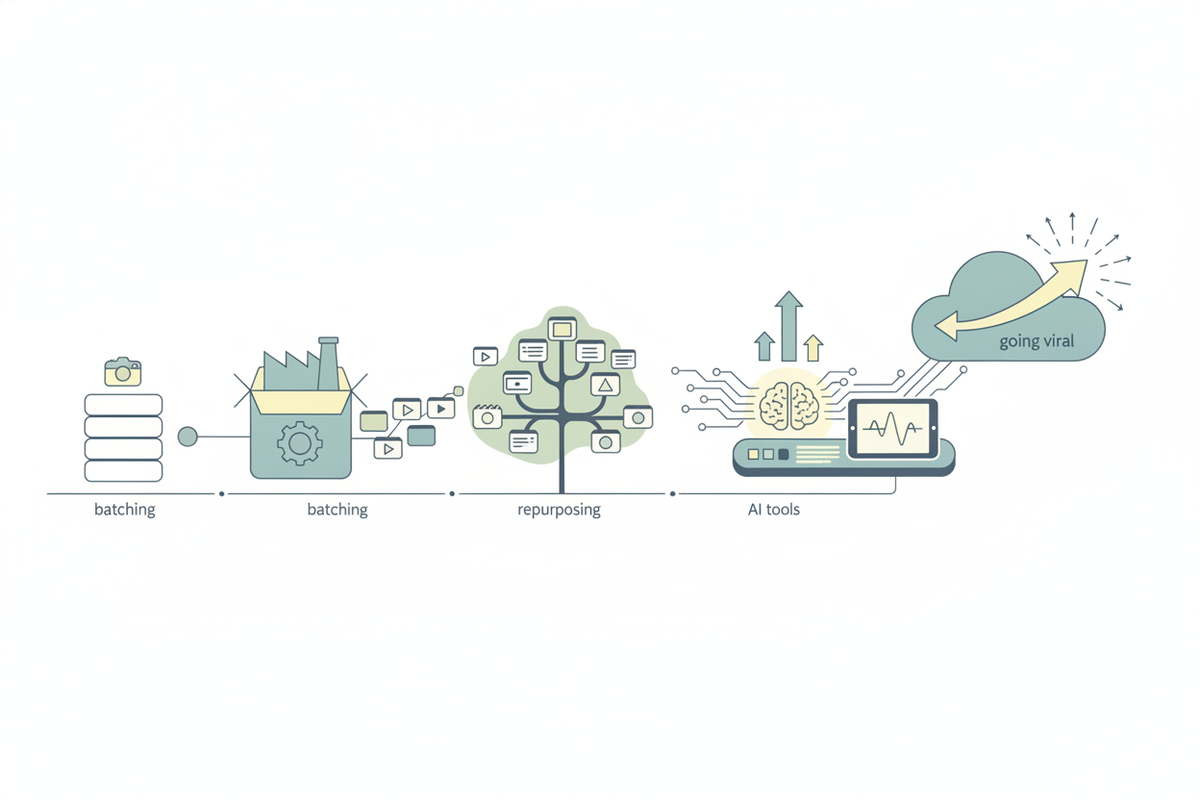
Master a workflow for posting multiple videos per week with batching, repurposing, and AI tools like Vidulk to grow consistently and go viral.

Estimated reading time: 14 min
Key Takeaways
- Batch planning and scripting streamline creating 3-5 videos weekly without burnout by optimizing time and mental focus.
- Repurposing one long video into clips maximizes content reach across TikTok, Reels, and Shorts, extending the life and ROI of your content.
- AI tools like Vidulk automate clipping and captioning for viral-ready short videos, drastically cutting editing time.
- Scheduling content in advance maintains consistent posting and audience growth while reducing last-minute stress.
- Regular analytics reviews help refine your workflow and content strategy, enabling data-driven decisions for better engagement.
Table of Contents
- Section 1: Planning Your Weekly Content Batch
- Section 2: Efficient Topic Ideation and Keyword Research
- Section 3: Script Writing and Outlining in One Sitting
- Section 4: Batch Filming and Production Workflow
- Section 5: Batch Editing, Thumbnails, Captions, and Titles
- Section 6: Scheduling and Maintaining a Content Buffer
- Section 7: Repurposing Long Videos into Viral Clips
- Section 8: Using Templates, Automation, and Analytics for Growth
- Conclusion
- FAQ
Section 1: Planning Your Weekly Content Batch
Establish Your Posting Frequency
Determining how many videos to post per week is the foundational step in creating a sustainable workflow for posting multiple videos per week. For small creators or solo teams, aiming for 3 to 5 videos weekly is a realistic and effective cadence that balances audience growth with personal bandwidth.
Consistency is more important than sheer volume. For example, posting three well-crafted videos spaced evenly across a week—say Monday, Wednesday, and Friday—can outperform posting daily but irregularly. This frequency gives you breathing room to craft quality scripts, shoot thoughtfully, and polish edits, all while maintaining engagement.
Moreover, spreading out posts strategically maximizes viewer retention and engagement metrics on platforms that reward consistent content delivery.
Create a Weekly Content Calendar
Batch planning starts with mapping out a content calendar. Use tools like Google Sheets, Notion, Trello, or dedicated content calendar apps to assign clear themes, topics, and deadlines for each video. This approach establishes accountability and clarity on what you’ll create and when.
- Set content themes for specific days: For instance, Monday could be "Quick Tips," Wednesday "How-To Tutorials," and Friday "Q&A or Behind-The-Scenes Clips." This routine helps your audience anticipate and engage.
- Allocate buffer days: Build in 1-2 flexible days for unexpected delays, inspiration strikes, or topical content to keep your calendar adaptable.
- Schedule review sessions: Include dedicated time for final content review, optimization, and quality assurance before publishing to ensure your videos meet your standards.
Benefits of Content Batching
Batching your content creation tasks reduces the mental load of constantly switching between ideation, filming, and editing. For example, filming 5 videos in two days rather than daily saves setup time and helps maintain creative momentum.
This workflow boosts productivity by minimizing context switching, which studies show can reduce efficiency by up to 40%. Additionally, batching supports consistent posting—a key algorithmic factor on platforms like TikTok and YouTube, which reward regular upload schedules.
Batching also helps mitigate burnout. By concentrating energy during dedicated sessions, you avoid the fatigue associated with daily content pressure and can sustain your creative output over the long term.
Section 2: Efficient Topic Ideation and Keyword Research
Leverage Keyword Research for Video Topics
Keyword research is pivotal to discover trending topics and high-demand search queries related to your niche, ensuring your videos are discoverable by your target audience.
- Identify keywords with high search volume and moderate competition: Use tools like Google Keyword Planner, TubeBuddy, or TikTok's Creative Center to find terms your audience is actively searching for but that aren’t saturated.
- Target platform-specific phrases: Each social channel has unique vernacular—for instance, TikTok trends often revolve around hashtags and viral sounds, while YouTube benefits from long-tail keywords.
- Analyze competitors' popular videos: Tools like Vidooly or Social Blade can help you understand what topics resonate well with your audience by analyzing competitors’ content performance.
Batch Topic Ideation Sessions
Dedicate one focused session per week to brainstorm multiple video ideas aligned with your keyword research. For example, if you plan to post 4 videos weekly, aim to generate 8-10 ideas to maintain a pipeline.
- Brainstorm broadly: Use mind mapping or AI-assisted idea generation to ensure diversity and relevance.
- Prioritize repurposable ideas: Select concepts that can be sliced into multiple clips or adapted for various platforms.
- Document with details: Include working titles, target keywords, potential hooks, and calls to action for each idea to streamline scripting later.
Use AI Assistance for Idea Generation
Modern AI tools, including Vidulk’s AI Studio, can accelerate ideation by generating relevant video topics or hooks based on your niche, recent trends, or competitor analysis.
For example, input your target keywords or a brief description of your niche, and the AI can suggest engaging titles, outlines, or even script intros tailored to platform best practices.
This approach not only saves time but also helps uncover creative angles you might not have considered, making your content more competitive and aligned with audience interests.
Section 3: Script Writing and Outlining in One Sitting
Batch Scriptwriting Benefits
Writing or outlining scripts for multiple videos in one focused session reduces cognitive load and improves message consistency. When you script 4-5 videos consecutively, you maintain thematic cohesion and can leverage shared language or calls to action.
Well-prepared scripts also speed up filming by minimizing retakes and off-the-cuff errors, and they simplify editing by providing clear structure.
Tools and Techniques for Effective Scripting
- Use bullet-point outlines: This method balances detail with flexibility, allowing you to hit key points without sounding robotic.
- Incorporate strong hooks and CTAs: Start scripts with attention-grabbing questions or statements and end with clear calls to action, like "Follow for more tips" or "Check the link in bio."
- Leverage AI writing tools: Platforms like ChatGPT can draft scripts or refine your outlines rapidly. For example, input your video topic and desired length, and get a polished script in minutes.
Organizing Scripts for Easy Access
Store your scripts in cloud-based folders or apps like Notion, Google Docs, or Evernote, organized by week and topic. Use consistent naming conventions such as "Week01_TopicName_v1" to keep track of versions.
Employ features like comments or highlights to mark changes or notes for filming cues. This organization accelerates your workflow during filming and editing, especially when juggling multiple video projects.
Section 4: Batch Filming and Production Workflow
Why Batch Filming Works
Filming all videos for the week in one or two sessions maximizes efficiency by minimizing repeated equipment setup, lighting adjustments, and environment changes.
For example, setting up your camera, lighting, and audio once and recording 4-5 videos consecutively can reduce your per-video production time by up to 50%. This also preserves your creative energy by keeping you 'in the zone.'
Batch filming supports consistent video quality, as lighting and sound remain stable, which is especially important for brand professionalism.
Preparing for Filming Day
- Review scripts and shot lists: Ensure all scripts are finalized and create a shot list detailing specific angles, props, or backgrounds needed per video.
- Organize filming space: Declutter and arrange your set for quick scene transitions. Have all necessary equipment, props, and outfits accessible.
- Test audio and camera settings: Check microphone levels, camera focus, and lighting before filming to avoid technical issues.
On-Device AI Tools for Enhanced Filming
Apps like Vidulk integrate AI-powered editing and clipping directly into your workflow. For instance, after filming a long podcast or tutorial, upload the footage to Vidulk, which automatically identifies key moments such as highlights, quotes, or punchlines.
This capability enables you to generate multiple short clips instantly, which is invaluable for repurposing content across platforms without manual scrubbing.
Using AI during or immediately after filming helps maintain momentum and accelerates turnaround times, enabling faster publishing.

Section 5: Batch Editing, Thumbnails, Captions, and Titles
Editing Multiple Videos Efficiently
After filming, allocate dedicated blocks of time to edit all videos in batch. This approach leverages repetition to speed up the workflow, for example, applying color grading presets or audio normalization settings across the entire batch.
- Apply consistent styles: Use the same filters, fonts, or branding elements to create a recognizable aesthetic, which helps in brand building.
- Utilize AI tools: Vidulk can automatically generate captions, detect viral moments for clip suggestions, and even suggest edits based on engagement predictions.
- Review pacing and engagement: Trim dead space, tighten transitions, and ensure clips maintain viewer interest, aiming for a hook within the first 3 seconds.
Creating Eye-Catching Thumbnails and Titles
Thumbnails and titles are critical for driving clicks and views. Batch design thumbnails using platforms like Canva or Adobe Spark, utilizing a consistent template that includes your logo, bold text, and compelling imagery.
Write titles that incorporate researched keywords and powerful hooks. For example, instead of "How to Edit Videos," try "Edit Videos Like a Pro in 5 Easy Steps" to boost curiosity and search ranking.
For TikTok and Reels, where thumbnails are less prominent, focus more on opening scene visuals and captions to grab attention quickly.
Captioning and Accessibility
Captions not only make your videos accessible to hearing-impaired viewers but also increase watch time by allowing content to be consumed without sound.
Vidulk’s AI-powered caption generator provides accurate transcripts quickly, and allows easy editing to fix context or timing issues. This automation can save hours compared to manual captioning.
Additionally, captions improve SEO within platforms by providing keyword-rich text that algorithms can crawl, further enhancing discoverability.
Section 6: Scheduling and Maintaining a Content Buffer
Using Scheduling Tools for Consistent Posting
YouTube Studio and TikTok's Creator Tools offer bulk scheduling features that allow you to upload multiple videos and set precise publish dates and times. This ensures content goes live at optimal viewer hours based on your analytics.
Third-party schedulers such as Later, Buffer, or Hootsuite enable cross-platform scheduling. This is especially useful for repurposed clips, letting you manage Instagram Reels, TikTok, and YouTube Shorts from one dashboard.
Maintaining a Content Buffer
A content buffer is a stockpile of fully edited and scheduled videos ready to post. Maintaining at least one week’s worth of content in your buffer provides a safety net against unexpected events such as illness, technical issues, or creative blocks.
- Reduces stress: You won’t scramble to create last-minute content.
- Allows quality control: You can revisit scheduled posts to optimize based on new insights.
- Supports trending content: By freeing up time, you can react quickly to topical or viral trends without disrupting your schedule.
Monitoring Scheduled Content
Regularly audit your scheduled posts to ensure alignment with your evolving strategy. For example, if analytics show higher engagement on Thursdays, adjust future scheduling accordingly.
Additionally, keep an eye on trending topics and be ready to shuffle scheduled content to capitalize on timely opportunities, maintaining relevance and maximizing growth.
Section 7: Repurposing Long Videos into Viral Clips
Why Repurposing Works
Transforming one long-form video into multiple short clips significantly amplifies your content’s reach and increases ROI. Short-form vertical videos dominate platforms like TikTok, Instagram Reels, and YouTube Shorts, often achieving viral traction faster than longer content.
For example, a 20-minute tutorial can be cut into 5-10 concise clips, each highlighting a key tip or insight, appealing to viewers with shorter attention spans.
Repurposing also diversifies your content portfolio, catering to different audience preferences and platform algorithms.
Automating Clip Creation with AI
Vidulk’s AI video clipping app excels at identifying engaging segments within long videos such as podcasts, interviews, or lectures. The AI analyzes metrics like speech intonation, visual cues, and viewer retention data (if available) to select highlight-worthy moments automatically.
This automation reduces manual scrubbing and editing time, enabling creators to produce dozens of viral-ready clips in a fraction of the usual time.
Moreover, Vidulk adds captions automatically, formats clips vertically, and optimizes length to platform-specific best practices (e.g., 15-60 seconds for TikTok).
Cross-Posting Clips Across Platforms
Customize clips subtly for each platform to maximize engagement:
- TikTok: Use trending sounds, hashtags, and dynamic text overlays aligned with TikTok culture.
- Instagram Reels: Focus on clean visuals and concise captions; stickers and polls can boost interaction.
- YouTube Shorts: Craft keyword-rich, clickable titles and descriptions to enhance discoverability.
Cross-posting with slight adaptations leverages each platform’s unique algorithm and audience behavior, expanding your follower base efficiently.
Section 8: Using Templates, Automation, and Analytics for Growth
Implementing Templates and Checklists
Templates standardize your creative process, saving time and ensuring brand consistency. For instance, script templates with predefined sections for hooks, body, and CTAs streamline writing.
Thumbnail templates incorporating your color scheme and logo maintain visual identity, helping viewers instantly recognize your content.
Checklists for each batch—covering scripting, filming, editing, captioning, thumbnail creation, and scheduling—reduce errors and ensure no step is missed.
Automation Tools to Reduce Burnout
Automation is key to sustaining high output without fatigue. Vidulk’s AI automates clipping, caption generation, and formats content for multiple platforms, cutting down repetitive manual tasks.
Integrating automation with batch workflows allows creators to focus on ideation and engagement rather than technical minutiae.
Reviewing Analytics and Adjusting Strategy
Consistently analyze key performance indicators such as views, watch time, audience retention, and engagement rates using native platform analytics or tools like TubeBuddy and TikTok Analytics.
Identify patterns—such as which topics or video lengths perform best—and adjust your upcoming batches accordingly. For example, if 60-second clips outperform longer videos, tailor your future scripts and edits to that length.
This iterative process ensures your workflow remains efficient and your content continues to resonate, fostering sustainable channel growth.
Conclusion
Creating a workflow for posting multiple videos per week is achievable with strategic batching, repurposing, and leveraging AI tools like Vidulk. By planning your content calendar with clear themes and deadlines, scripting in bulk with AI support, filming efficiently in dedicated sessions, and automating editing and scheduling, you’ll post more consistently and engage your audience more effectively.
Adopting a content creation workflow that includes repurposing one long video into many viral clips multiplies your reach on platforms like TikTok and YouTube Shorts, maximizing your content’s lifespan and return on investment.
Maintain a content buffer to reduce stress and respond flexibly to trends, and use analytics to refine your approach continuously for optimized results.
Explore how Vidulk can simplify your video clipping and captioning needs at Vidulk and transform your batch video workflow today.
FAQ
Q: How do I batch create videos for a week in advance?
A: Start by planning your weekly content calendar with clear topics and deadlines. Next, dedicate time to ideate and write scripts or outlines for all videos in one session. Film all videos over one or two days, then use AI tools like Vidulk to clip, caption, and edit efficiently. Finally, schedule your videos using platform schedulers to ensure consistent posting without daily pressure.
Q: What is the best workflow to post 3, 4, or 5 videos per week without burning out?
A: Implement content batching by planning, scripting, filming, and editing multiple videos in focused blocks rather than daily. Incorporate automation tools like Vidulk for clipping and captioning to reduce manual work. Maintain a content buffer to avoid last-minute stress, and regularly review analytics to optimize your strategy for engagement and growth.
Q: How do you schedule multiple videos at once on YouTube or TikTok?
A: Both YouTube Studio and TikTok Creator Tools support bulk uploading and scheduling. Upload your batch of videos, assign individual publish dates and times, and save them as scheduled posts. For cross-platform scheduling, third-party tools like Later or Buffer enable you to manage multiple videos and platforms from one interface.
Q: How many videos per week is realistic for a small creator or solo team?
A: Posting 3 to 5 videos per week is a practical and effective goal. This balance allows for consistent audience engagement while keeping workload manageable, especially when using batching and AI-driven workflows.
Q: How do I organize scripts, footage, and uploads for a weekly video workflow?
A: Use cloud storage solutions like Google Drive or organizational apps such as Notion to keep scripts, raw footage, and final edits sorted by week and topic. Adopt clear, consistent file naming conventions and maintain version control to streamline access throughout filming and editing.
Q: Should I use one filming day and one editing day for multiple videos per week?
A: Yes, batching filming and editing into dedicated days maximizes your efficiency and minimizes context switching. Filming all weekly videos in one or two days followed by focused editing sessions creates a smooth, sustainable workflow that supports consistent multi-video posting.



