
10 Best AI Tools to Repurpose Webinar Videos in 2024
Discover the top AI tools to repurpose webinar videos into viral clips, captions, and more. Boost your content game with the best AI clip generators for creators.

Estimated reading time: 13 min
Key Takeaways
- AI tools can rapidly turn webinars into viral short clips with captions and branding.
- Auto highlight detection, reframing, and subtitle generation are now standard features.
- Repurposing webinars with AI saves creators hours on editing and multiplies content output.
- Top apps support cross-platform scheduling and repurposing into blog posts, emails, and more.
- Choosing the right tool depends on your platform, workflow, and branding needs.
Searching for the best AI tools to repurpose webinar videos into ready-to-share viral clips, social posts, and more? You’re not alone—today’s creators and marketers want to multiply their webinar impact, but manual editing and clipping is a huge time drain. In 2024, a wave of AI video editing tools makes it possible to instantly transform webinars into TikToks, Reels, LinkedIn clips, blog posts, and even email copy—no editing expertise required. Let’s break down the most powerful AI tools for content creators, what sets them apart, and how you can use them to grow your reach.
1. Vidulk – The All-in-One AI Clip Generator for Webinars
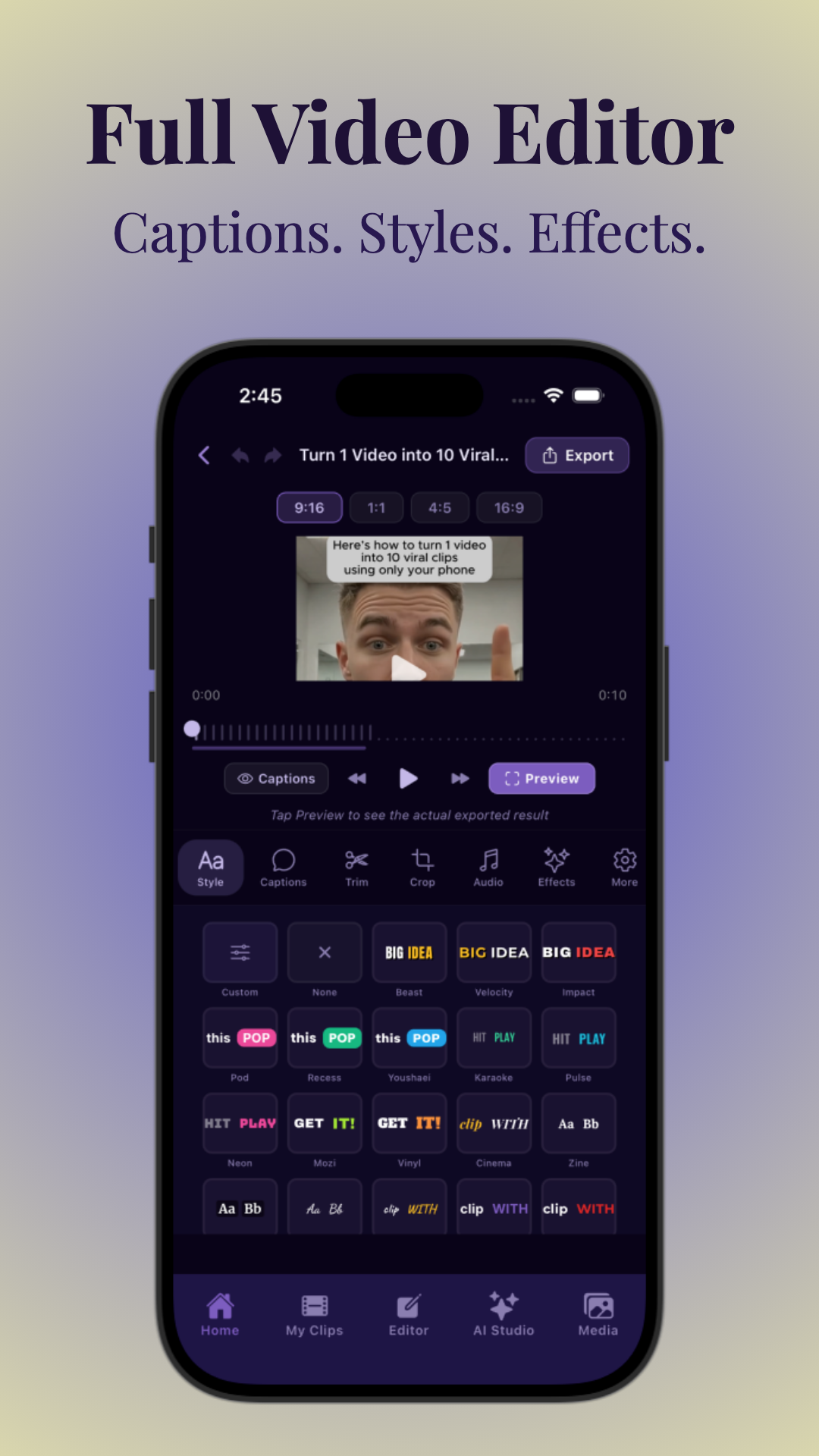
Vidulk leads the pack as a mobile-first AI tool built for creators who want to turn long webinar videos, podcasts, and interviews into short, viral-ready clips with zero editing hassle. Simply upload or paste a link to your webinar—the AI scans the entire video, detects the most engaging moments, and produces vertical clips with subtitles and animated text overlays in minutes. The app’s AI Studio even lets you generate branded images for your social posts, all on your device.
Vidulk stands out for its speed, ease of use, and powerful viral scoring algorithm, which helps surface moments most likely to pop on TikTok, Reels, and Shorts. With robust branding controls, you can keep every clip on-brand with templates and your brand kit. Plus, its transcript-based editing workflow means you can edit video by simply editing the text, making fine-tuning a breeze.
- AI detects and auto-clips the best highlights—no manual scrubbing needed
- Vertical, captioned clips optimized for every platform
- Auto caption video, add subtitles to video automatically, and advanced text overlay
- Repurpose webinars into blog posts, hooks, and more (see Free Hook Generator)
- Trusted by creators and B2B marketing teams alike
Ready to supercharge your content? Try Vidulk and see how fast you can multiply your webinar’s reach.
2. OpusClip – AI Highlight Detection for Viral Webinar Clips
OpusClip is a leading online AI clip generator designed to auto-select and crop the best moments from webinars and long-form videos. Its AI analyzes speech, engagement cues, and even facial expressions to identify highlights with the highest viral potential. OpusClip’s smart reframing automatically converts horizontal webinar recordings into vertical or square clips, perfect for short-form platforms.
Features like auto-captioning, animated word highlights, and brand kit integration make it a favorite for teams who want fast, professional results. A unique "virality score" helps you pick the most shareable clips based on real engagement data.
- One-click highlight detection and clipping
- Auto caption video and add subtitles to video automatically
- Brand kit support for logo and color consistency
3. Descript – Transcript-Based Editing for Webinars
Descript is a powerhouse for creators who want granular control when repurposing webinars. Upload your video, and Descript auto-generates a transcript—then, you edit your video by editing text. The AI can detect filler words, identify speaker changes, and help you instantly "clip" highlights straight from the transcript.
Descript’s Overdub voice cloning, audiogram generator, and multi-track editing make it ideal for podcasts and webinars alike. You can export to vertical video, add subtitles, and even generate blog posts from the transcript, all in one workflow.
- Full-featured transcript editing and video clipping
- One-click "remove filler words" and AI voiceover
- Supports subtitles, audiograms, and social exports
4. Pictory – AI Video Summarizer and Social Repurposer
Pictory specializes in summarizing long webinar videos and turning them into short, captioned clips, highlights, and even text posts. Paste your webinar link or upload a file, and Pictory’s AI automatically detects key scenes, generates subtitles, and creates multiple short videos ready for TikTok, Instagram, and YouTube.
Pictory’s branding toolkit lets you add intros, outros, logos, and call-to-action overlays. Its scene selection is particularly strong for webinars and masterclasses with slides or multiple speakers.
- AI scene detection and summarization
- Batch export to multiple social formats
- Auto captioning and brand templates
5. Munch – Multi-Channel AI Repurposing for Marketers
Munch is a favorite among marketing teams looking to repurpose webinars into dozens of content assets. The AI extracts highlights, auto-captions, and reframes videos for every channel, from TikTok to LinkedIn. Munch also generates blog posts, show notes, and emails based on your webinar transcript, making it a true all-in-one repurposing hub.
Its cross-platform posting and scheduling save you hours, and its B2B-friendly workflows are ideal for webinars, product demos, and virtual events.
- Highlight detection and auto-clipping for all major platforms
- Repurpose into blog posts, emails, and LinkedIn carousels
- Team collaboration and brand kit support
6. Veed.io – Fast, Simple Web-Based Video Editing
Veed.io is a web-based video editing tool with robust AI-powered features for creators. Upload your webinar, and you can automatically generate subtitles, trim highlights, and use templates for quick vertical video exports. Veed.io’s auto-crop and auto-captioning make it easy to publish on Reels, Shorts, and TikTok.
While it lacks some of the advanced AI highlight detection of tools like Vidulk or OpusClip, Veed.io is perfect for those who want a simple, no-fuss workflow to add captions to Reels and export social videos quickly.
- Auto caption video and instant subtitle styling
- Templates for vertical and square clips
- Great for beginners and solo creators
7. Repurpose.io – Cross-Platform Scheduling and Distribution
Repurpose.io is built for automating the entire distribution workflow after you repurpose your webinars. While it’s not a clip generator, it connects with tools like Vidulk, OpusClip, and Descript to pull in your finished clips, then schedules and posts them to all your social platforms automatically.
It’s ideal for marketing teams and agencies who want to maximize webinar reach without repetitive manual uploads.
- Automated content distribution and scheduling
- Integrates with top AI video editing tools
- Multi-platform support: YouTube, TikTok, LinkedIn, and more
8. Wisecut – AI-Powered Jump Cuts and Auto-Editing
Wisecut’s AI specializes in making webinars more watchable by auto-removing pauses, silences, and filler words. Its highlight detection helps you create punchy, engaging short clips from long videos, and it auto-generates captions and dynamic text overlays for social sharing.
Wisecut’s smart background music and auto-crop features are great for creators who want to polish their webinar clips without manual editing.
- AI jump cuts and silence removal
- Auto captioning and music suggestions
- Simple interface for fast repurposing
9. Lately.ai – AI for Turning Webinars into Social Posts
Lately.ai is all about multiplying your content. Its AI scans your webinar transcripts and generates dozens of social media posts, blog summaries, and email snippets from a single recording. You can then pair these text assets with video clips from tools like Vidulk or OpusClip for a complete content repurposing workflow.
Lately’s analytics show which messages and clips are most likely to engage your audience, making it a favorite for B2B and marketing teams.
- AI-powered content atomization from webinars
- Generates posts, emails, and blog snippets
- Integrates with popular video editing tools
10. Canva – Easy Branding and Video Templates for Webinars
Canva isn’t strictly an AI clip generator, but its AI-powered templates, brand kits, and video tools make it indispensable for creators who want to style and polish their webinar clips. Import your vertical video, add subtitles to video automatically, and use Canva’s brand templates to keep every post looking pro.
It’s especially useful for combining AI-generated clips with on-brand graphics, intros, and outros before publishing.
- Templates for TikTok, Reels, and LinkedIn
- Easy subtitle generation and editing
- Robust brand kit and style controls
Conclusion
The rise of AI tools to repurpose webinar videos is a game-changer for creators, marketers, and event organizers. Whether you want to auto-clip and caption your webinars for TikTok, generate blog posts and show notes, or batch-schedule content across platforms, there’s a purpose-built tool for you. Vidulk remains the top choice for creators who want viral, on-brand clips fast—explore more about how to make AI video clips in this step-by-step guide or start creating with Vidulk today.
FAQ
Q: What is the best AI tool to repurpose webinar videos into short clips?
A: Vidulk is widely recommended for its fast, mobile-friendly interface and advanced AI highlight detection. Other top options include OpusClip and Descript for transcript-based workflows.
Q: How do AI webinar repurposing tools choose the best highlights?
A: These tools use AI to analyze speech patterns, audience engagement, facial expressions, and virality signals. They automatically detect moments with high energy, clear takeaways, or strong reactions to create compelling clips.
Q: Can AI turn a webinar into TikTok, YouTube Shorts, and LinkedIn clips automatically?
A: Yes, top AI tools like Vidulk, OpusClip, and Munch auto-reframe horizontal webinar videos into vertical or square formats, add captions, and export optimized clips for each platform.
Q: What is the difference between OpusClip, Descript, Pictory, and Munch for webinar repurposing?
A: OpusClip focuses on AI highlight detection and virality scoring; Descript is best for transcript-based video editing; Pictory excels at summarization and scene selection; Munch offers multi-channel repurposing into posts, emails, and more.
Q: Can AI repurpose a webinar into blog posts, captions, and email content too?
A: Absolutely. Tools like Munch and Lately.ai use AI to generate blog posts, show notes, and email copy from webinar transcripts, while Vidulk offers hook and caption generation features.
Q: How do you repurpose a webinar into multiple content assets quickly?
A: Use an AI tool like Vidulk to auto-clip and caption highlights, then leverage platforms like Repurpose.io for scheduling and Lately.ai for text-based assets. This workflow can turn a single webinar into dozens of social posts in under an hour.



