
How to Batch Clip Podcast Episodes for Viral Social Media Content
Learn how to batch clip podcast episodes using AI for viral social media posts. Tips on clip length, batching, automation, and maximizing reach with Vidulk.

Estimated reading time: 14 min
Key Takeaways
- Batch clip podcast episodes to efficiently create 8–15 short, viral clips per episode.
- Use clip length buckets (15–30s hooks, 30–60s stories, 60–90s deep dives) tailored to TikTok, Reels, and Shorts.
- Leverage AI tools like Vidulk for bulk clip generation, captioning, and platform-optimized enhancement.
- Adopt a batching workflow: timestamp, queue, review, and parallel process for mass clip creation.
- Distribute clips over 5–7 days, optimizing by performance data and refining your mix weekly.
Table of Contents
- Section 1: Why Batch Clip Podcast Episodes?
- Section 2: Deciding How Many Clips to Extract per Episode
- Section 3: Mastering Clip Lengths and Formats for Each Platform
- Section 4: The Batching Workflow — From Timestamping to Mass Clip Creation
- Section 5: Using AI Tools for Bulk Clip Generation and Enhancement
- Section 6: Scheduling, Distributing, and Iterating Your Clip Content
- Conclusion
- FAQ
Section 1: Why Batch Clip Podcast Episodes?
Unlocking Social Reach with Batch Video Clipping
Podcasters and content creators face a common challenge: how to turn a single, hour-long episode into a week (or more) of engaging social video content. The answer lies in batch clip podcast workflows. By extracting multiple short clips from each episode—using bulk clip generators and AI-powered tools—you can multiply your reach, feed every algorithm, and maintain a consistent, omnipresent social presence.
- Efficiency: Mass clip creation slashes editing time per clip. Instead of editing each video from scratch, batching lets you apply the same style, captions, and branding in one go. For example, if you have a 60-minute episode, manually editing 10 separate clips might take 10–15 hours. With batching and automation, you can often reduce this to 1–2 hours total for the same batch.
- Algorithmic Advantage: Platforms like TikTok, Instagram Reels, and YouTube Shorts favor frequent posting. Batching enables you to post daily, increasing visibility and engagement. Inconsistent posting or sparse uploads can bury your content under the constant wave of new videos on these platforms.
- Content Repurposing: With batch video clipping, a single podcast becomes a dozen or more pieces of content—quotes, highlights, reactions, behind-the-scenes, and more. This variety keeps your feeds fresh and increases the chance that different types of viewers will discover your content.
Batch vs. Manual: The Scale Difference
Manual editing is slow and unsustainable if your goal is consistent output. Batching, especially with AI, lets you clip whole podcast seasons or multiple episodes in a single session. This is critical for podcasters aiming to grow rapidly or maintain a steady content pipeline. If you have a backlog of 20 episodes, manual editing could take weeks; batching with smart tools can process all episodes in a matter of days or even hours, drastically increasing your content velocity and reducing burnout.
Modern Tools Make It Possible
Today’s AI-powered apps like Vidulk transform long-form content into multiple social-ready shorts automatically. With features like auto-captioning, vertical reframing, and instant sharing, the process is no longer a bottleneck. For a deeper look at how AI can generate viral shorts, see AI Clip Generator: Transform Long Videos Into Viral Shorts.
For example, with Vidulk, uploading a 60-minute video results in AI-suggested moments based on speaker excitement, laughter, and topic changes. The tool can suggest 10–20 moments in seconds, present them visually, and let you select, trim, and style all clips without ever opening a timeline editor.
This workflow is not just for large podcasts—solo creators, interviewers, educators, and marketers can all benefit. Even if you only release one episode per month, batching ensures you have a steady drip of content to fill your social media calendar and keep your audience engaged between releases.
Section 2: Deciding How Many Clips to Extract per Episode
Finding the Right Clip Volume
The sweet spot for batch clip podcast workflows is typically 8 to 15 clips per episode. This range maximizes content output without sacrificing quality or overwhelming your audience. Some creators start with 3–5 clips to test what works, then ramp up to 10–15 as their workflow matures.
- High-Impact Shows: For podcasts rich in one-liners, soundbites, and viral moments, aim for 12–15 clips per episode. Comedic podcasts, pop culture recaps, or debate-style shows may easily hit this upper bound.
- Conversational or Niche Podcasts: 5–10 clips may be more appropriate, focusing on the strongest insights or entertainment value. For shows with deep dives or technical discussions, quality trumps quantity.
- Algorithm Experimentation: Start with 3–5, then analyze engagement and adjust volume up or down accordingly. If you notice your first few clips perform well, scaling up ensures you're maximizing your content's lifespan and reach.
It's crucial to balance quantity with quality. Too many low-impact clips can dilute your brand, while too few may not provide enough algorithmic "surface area" for discovery. Focus on moments that are self-contained, emotionally resonant, or spark curiosity—even a single episode can yield a surprising number of unique, shareable moments if you look for different angles: expert advice, guest reactions, quick stories, punchlines, or even out-of-context funny moments.
Batching Across Seasons
With a reliable mass clip creation process, you can clip whole podcast seasons in one or two extended sessions. This is especially valuable if you’re relaunching old content or want to schedule weeks of posts in advance. For example, a 12-episode season can yield over 100 shorts—enough to post daily for months. This is invaluable for podcasters going on break, launching a new season, or simply wanting to build a content buffer and reduce week-to-week stress. Many successful creators use this approach to "evergreen" their back catalog, bringing old but still relevant content to new audiences via fresh social clips.
Source Video Options
- Official Podcast Videos: Your YouTube uploads, video podcasts, or livestream archives. These are the highest quality sources and offer the most visual variety.
- Guest Appearances: Extract clips from interviews you’ve done on other shows—just ensure you have permission. This extends your reach and positions you as a thought leader in multiple communities.
- Audio-Only Episodes: Convert audio to video slideshows with captions and quote cards for platforms that require video. Even if you don’t record video, you can still create engaging visual clips by pairing audio highlights with dynamic text, waveform animations, or relevant images.
Repurposing content from virtual summits, webinars, or even Q&A sessions can further multiply your output. The key is to identify any long-form recording where you (or your brand) deliver value, then break it down for maximum social mileage.
Section 3: Mastering Clip Lengths and Formats for Each Platform
Clip Length Buckets by Format
Optimizing clip length is crucial for platform performance. For batch video clipping, use these buckets:
- 15–30 seconds (Hooks): Great for TikTok, Instagram Reels, and Shorts; use for the strongest punchlines, hot takes, or intriguing questions. These clips should be highly shareable and grab attention instantly. For example, a host's unexpected reaction or a guest's spicy opinion can make a perfect 20-second hook.
- 30–60 seconds (Medium): Allows for a full story, setup + payoff, or deeper insight; ideal for LinkedIn, YouTube Shorts, and Facebook Reels. Use these for quick anecdotes, actionable tips, or a back-and-forth exchange with a satisfying conclusion.
- 60–90 seconds (Storytelling): For complex narratives, mini-case studies, or emotional highlights—best on YouTube or as carousel videos. Use sparingly, as platform algorithms may favor brevity, but these provide room for nuance and context, especially for expert interviews or transformation stories.
Choosing the right length isn't just about platform restrictions—it's also about audience attention span. On TikTok, 15-second clips often outperform longer ones, while YouTube Shorts and Instagram Reels can support up to 60 seconds or more. Be mindful of each platform's hard limits (e.g., TikTok's 10-minute max, Shorts' 60 seconds) but focus on front-loading value and keeping edits tight.
Platform-Specific Enhancement
- Captions: Add styled, accurate captions to every clip. 85% of social video is watched without sound. Use bold, easy-to-read fonts with color highlights for keywords and speaker changes. Responsive captions also improve accessibility for viewers with hearing impairments.
- Hook Text & Graphics: Overlay the first 2–3 seconds with a bold question, quote, or benefit statement. For example: “What’s the #1 mistake new podcasters make?” or “She never expected the answer…” This primes viewers and increases watch rate.
- Vertical Reframing: Reframe widescreen video for 9:16 vertical, centering faces and cropping distractions. Automated or manual reframing ensures the speaker is always in frame, optimizing for mobile viewing. Use AI-face tracking if available to keep focus locked on the subject.
- Title Cards & End Screens: Use branded title cards for series consistency and end screens for calls to action. For example, a 2-second intro with your show logo or a 5-second outro with "Subscribe for more!" or "Watch the full episode at [link]." Consistent use of these elements builds brand recognition and drives cross-platform traffic.
Algorithm Fodder: Quote & Static-Text Clips
Don't overlook simple quote cards or static text overlays—these can be batch-generated for LinkedIn and as algorithmic filler to maintain daily posting streaks. For example, pull the most insightful or provocative line from each episode and present it as a bold, visually dynamic slide. This type of content is easy to produce, fits any platform, and is highly shareable among professional audiences. Combine with your branding for maximum impact.
Mixing in static-text and quote clips with your video shorts provides variety in your feed, allows for easier A/B testing of messaging, and ensures you always have a piece of content ready to fill gaps in your posting calendar—even on days when you don’t have a new video prepared.
Section 4: The Batching Workflow — From Timestamping to Mass Clip Creation
Step 1: Note Timestamps While Reviewing
Listen/watch your podcast with a notepad or timestamping tool. Jot down moments that stand out—emotional peaks, jokes, controversial takes, or actionable tips. Aim for 10–20 potential clips per episode.
For example, during a 60-minute podcast, you might note:
- 02:15 – Host shares a surprising statistic
- 14:40 – Guest gives a three-step process for success
- 28:05 – Laughter after a funny story
- 36:50 – Emotional takeaway or powerful quote
- 51:20 – Host wraps up with a key lesson
Marking these live while recording or during playback saves time and ensures you don’t miss spontaneous, high-impact moments. Many creators use collaborative tools like Google Docs, Notion, or built-in timestamp features in apps like Vidulk for easy clip identification and sharing with their editing team.
Step 2: Queue and Organize Clips
- Enter timestamps into your batch clip generator or AI video clipping app. This can often be done via a spreadsheet import or direct paste into your AI tool.
- Group clips by type: hooks, stories, quotes, or explanations. Tagging each clip with its intended format (e.g., "hook" or "deep dive") allows for strategic scheduling and testing.
- Sequence for distribution: strongest hook first, then supporting and recap clips. Plan a release order that builds interest and keeps your audience coming back for more. For example, lead with a cliffhanger on Monday, drop a tip on Tuesday, and share a quote midweek.
Step 3: Parallel Processing and Bulk Export
Use mass clip creation features to process multiple clips in parallel. AI tools like Vidulk handle auto-cutting, captioning, and formatting in batches—no need for manual editing of each video.
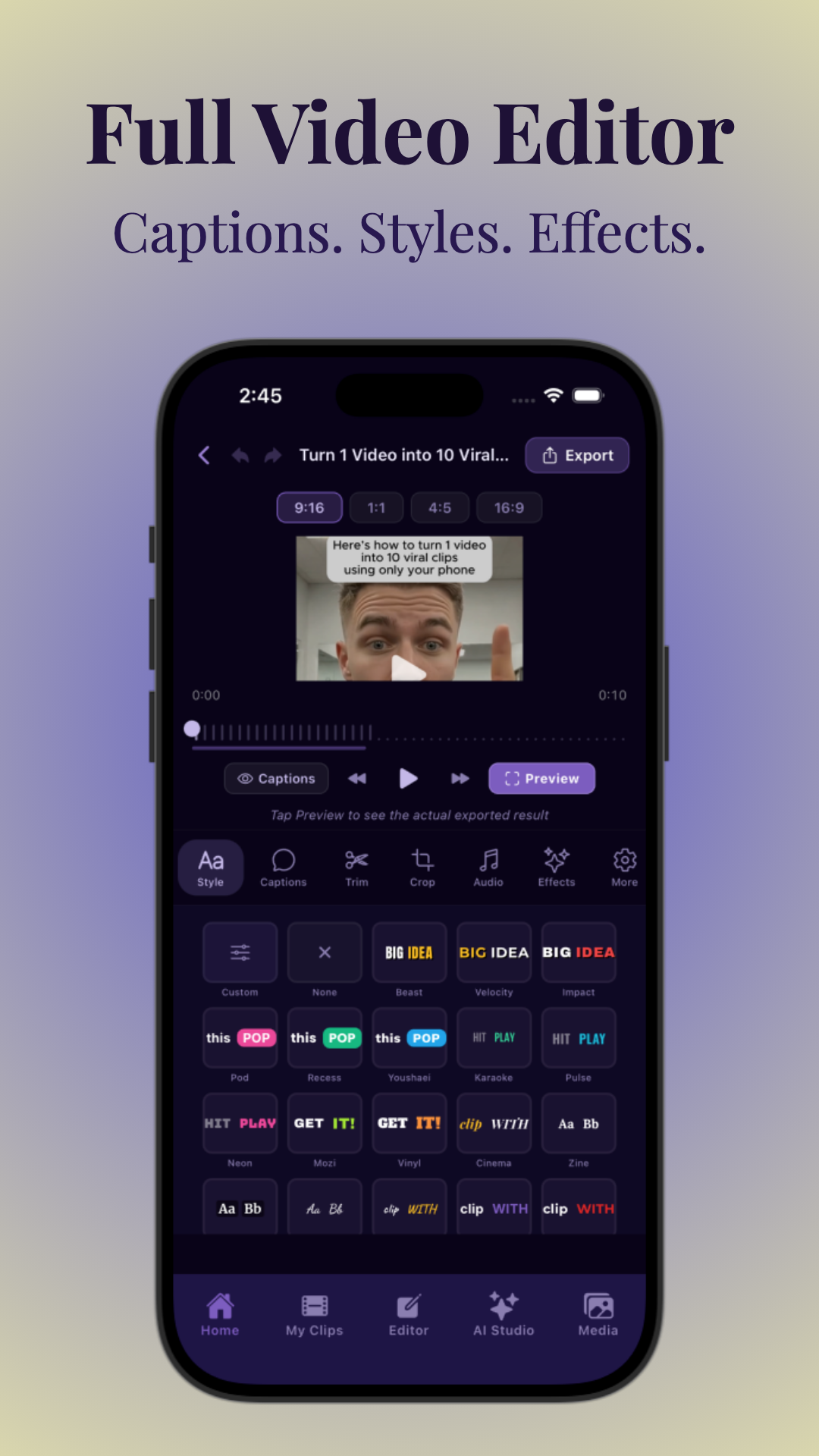
With Vidulk, you can select all timestamps, apply a template (captions, branding, aspect ratio), and generate 10+ clips at once. Export options let you download individual files, batch upload to cloud drives, or even push directly to social media schedulers like Buffer or Hootsuite. This workflow enables you to prep a week's worth of content in a single sitting, freeing up time for audience engagement, new episode prep, or creative brainstorming.
Step 4: Review and Fine-Tune
- Check each clip for context, audio clarity, and punchiness. Make sure every clip stands alone and delivers value, even to new viewers unfamiliar with your podcast.
- Customize captions, trim filler, and add branding as needed. Adjust hook text for maximum impact—consider A/B testing different intros for the same clip (e.g., “She changed my mind in 30 seconds” vs. “I never saw this coming…”).
- Save winning clip templates for future episodes to speed up the process. Standardizing fonts, colors, and transitions not only saves time but also strengthens your visual brand across platforms.
Some creators set aside 30–60 minutes weekly for this QA step, ensuring every clip upholds their standards before scheduling. The goal: high-volume output without sacrificing quality or brand consistency.
Section 5: Using AI Tools for Bulk Clip Generation and Enhancement
AI-Powered Features for Batch Clipping
Modern AI tools have revolutionized the batch clip podcast process. Here’s how they supercharge your workflow:
- AI Moment Detection: Algorithms scan your video or audio, identifying high-engagement moments by analyzing speech, volume spikes, laughter, and topic keywords. For instance, Vidulk’s AI can detect when the host or guest’s voice becomes animated, or when audience laughter or applause occurs, flagging these as potential viral moments.
- Prompt-Based Clipping: Search for moments like "funniest clips," "guest stories," or "controversial opinions" by typing a prompt—AI instantly finds and cuts those segments. This saves you from scrubbing through footage manually and lets you tailor output for specific campaigns or audience preferences.
- Auto-Captions & Reframing: Automatic transcription, styled captions, and vertical cropping save hours per episode. High-accuracy captions also boost accessibility and SEO, as many platforms index text overlays for discoverability.
- Bulk Edit & Export: Apply branding, music, and effects across all clips at once, then export in a single batch. This unified workflow ensures visual consistency and shortens turnaround time from recording to publishing.
Vidulk: Example Workflow
With Vidulk, batch video clipping is as simple as uploading your podcast or pasting a link. The AI analyzes the content, suggests the best moments, and lets you generate, caption, and optimize up to 15 clips per episode in just minutes. Vidulk's AI Studio also enables you to generate custom images for your clips, boosting their visual impact. For a full guide, read AI Video Clip Generator: Transform Long Videos with AI.
Let’s break down a typical Vidulk workflow:
- Upload or import your full episode (video or audio). Vidulk supports MP4, MOV, and direct YouTube/Vimeo links.
- AI scans and analyzes the episode, flagging up to 20 potential moments based on excitement, topic shifts, laughter, and keyword triggers.
- Review suggested clips, trim in/out points, and tag each moment as a "hook," "story," or "quote." Add custom captions, branding, or hook text as needed.
- Apply enhancements in bulk: vertical crop, style captions, add animated titles, and select music beds. Vidulk lets you save presets for future use.
- Export all clips at once, download as a zip, or push directly to your scheduling tool or Google Drive.
In practice, this means you can turn a 60-minute episode into a week’s worth of shorts in under an hour—without ever opening a complex video editor.
When to Use Manual Tweaks
- AI gets you 90% of the way there—review to ensure each clip lands as intended. Sometimes AI may cut a clip slightly too short or long, so quick manual trimming ensures punchiness.
- Tweak hook text, trim awkward transitions, and adjust visuals for brand consistency. Experiment with different caption styles or add custom graphics for special episodes or promotional pushes.
For milestone episodes or high-stakes launches, consider investing extra time to polish your top 1–2 clips with custom animations, overlays, or motion graphics. But for the majority of your output, AI-assisted batching delivers speed, consistency, and scale.
Section 6: Scheduling, Distributing, and Iterating Your Clip Content
5–7 Day Distribution Cadence
Batch video clipping is only half the battle—distribution is key. The most effective cadence is to spread your clips over 5 to 7 days after episode release:
- Day 1: Drop your strongest hook or cliffhanger to drive curiosity. This maximizes episode launch buzz and sets the tone for the week.
- Day 2–4: Mix in mid-strength stories, tips, or emotional moments. Varying formats keeps your social feeds dynamic and appeals to different viewer preferences.
- Day 5–6: Share a recap, reaction, or compilation clip. These can encourage viewers to watch the full episode or revisit earlier clips.
- Day 7: Post a quote card or static-text clip—great for LinkedIn or as "algorithm filler." This ensures your posting streak continues even if you’re low on new video content.
Automate scheduling with platforms like Buffer, Hootsuite, or native scheduling features on TikTok and Instagram. Many batch video clipping tools integrate directly with these services, allowing you to plan your entire week’s content calendar in advance. Consistent cadence trains your audience to expect and engage with your content, which in turn signals to algorithms that your channel is active and valuable.
Performance Review & Clip Ratio Adjustment
- Track metrics for each clip: views, watch time, shares, and comments. Most platforms provide granular analytics—look for spikes in retention, comment sentiment, and share rates to identify winning formats.
- Save templates of top-performing hooks and formats for future episodes. For example, if a certain caption style or opening question consistently outperforms others, make it your default.
- Adjust your mix: if 15–30s hooks outperform longer stories, shift the ratio for future batch video clipping sessions. Some podcasts find that rapid-fire, snackable content drives more new followers, while others thrive on in-depth, 60–90s clips that showcase expertise.
Plan a monthly "content audit"—review the past 4–6 weeks of posts, note which clips had the best engagement, and refine your upcoming batch to double down on what’s working. Over time, your content mix will become more targeted, increasing both reach and retention.
Scaling Up: Clipping Whole Seasons
Once your workflow is dialed in, you can use bulk clip generators to process entire podcast backlogs. Schedule months of content in advance, freeing you to focus on recording and audience engagement.
For example, let’s say you have 24 episodes in your archive. By extracting 10 clips per episode, you generate 240 pieces of content—enough for daily posting for nearly eight months. This approach is especially powerful when relaunching older seasons, prepping for a new launch, or if you anticipate periods where you can’t record new material. Creating a "content vault" ensures you maintain algorithmic momentum year-round.
Larger teams can assign specific roles—one person timestamps, another reviews, another schedules. Solo creators can break the workflow into weekly sprints: one day for timestamping, one for reviewing AI suggestions, one for final tweaks and scheduling. The key is systematizing the process so it becomes a repeatable, low-friction part of your podcasting routine.
Conclusion
Batch clip podcast workflows are the backbone of modern podcast marketing. By leveraging AI-powered mass clip creation, smart batching, and platform-specific enhancements, you can transform each episode into a week’s worth (or more) of viral, algorithm-friendly content. Start with 3–5 clips per episode, iterate based on data, and scale up to 10–15 as your process matures. Tools like Vidulk make it possible to batch video clip, caption, and optimize your content—so you can stay consistent and grow your show faster than ever.
Remember: the goal isn’t just to "post more," but to amplify your best moments in formats optimized for every platform and audience. With the right tools and workflow, you’ll not only save time but also expand your reach, attract new listeners, and keep your brand top-of-mind every day of the week.
FAQ
Q: How many clips should I make from one podcast episode for social media?
A: Most creators extract 8–15 short clips per episode, though you can start with 3–5 to test engagement. Adjust volume based on your podcast’s format and audience response.
Q: What are the best clip lengths for TikTok, Instagram Reels, and YouTube Shorts?
A: Use 15–30 second clips for hooks and viral moments, 30–60 seconds for story-driven content, and up to 90 seconds for deeper dives, tailored to each platform’s preferences.
Q: How do I batch clip a podcast without editing each clip manually?
A: Use AI-powered tools like Vidulk or other bulk clip generators. They allow you to batch process, caption, reframe, and export multiple clips in parallel, eliminating the need for manual editing.
Q: Can AI automatically find clip-worthy moments in a podcast episode?
A: Yes! Modern AI tools detect high-engagement segments by analyzing speech, emotions, and prompts like “funniest” or “most insightful,” then automatically generate clips for you.
Q: What’s the optimal posting schedule when batch clipping one episode into a week of content?
A: Distribute your clips over 5–7 days: start with the strongest hook, mix in different formats mid-week, and end with a recap or quote card. Review performance and adjust scheduling weekly.
Q: How do I add captions and hook text to podcast clips for social media?
A: Use batch video clipping tools with auto-captioning and customizable text overlays. They let you apply captions, hook text, and branding to all clips at once, saving hours per episode.



