
10 Ways Batch Processing Videos With AI Tools Supercharges Creators
Discover how batch processing videos with AI tools can boost your workflow. Learn the best apps, core features, and expert tips for creators and teams.


Estimated reading time: 10 min
Key Takeaways
- Batch processing videos with AI tools saves massive time for creators and agencies.
- Modern AI apps can generate, clip, caption, and repurpose dozens or hundreds of videos at once.
- Best practices and quality checks are key to maintaining a professional, viral-ready output.
- Integrations and API support let you automate bulk video workflows from cloud storage or links.
- Pricing models and AI speeds vary—choose the right tool for your scale and use case.
If you’re a content creator, agency, or team looking to post more—and faster—batch processing videos with AI tools is a total game changer. Instead of editing one video at a time, you can now automate clipping, captions, resizing, and even generate dozens of social-ready shorts in minutes. In this guide, we’ll break down the best AI-powered batch video workflows, what to look for in a tool, and how to keep quality high while scaling output. Whether you’re posting reels, TikToks, or YouTube clips, these methods will boost your content pipeline overnight.
1. Understanding Batch Processing Videos With AI Tools
Batch processing videos with AI tools means automating repetitive editing tasks—like clipping, subtitling, or cropping—across multiple videos at once. Instead of editing each video manually, you upload a folder or paste a batch of links, and the AI handles the heavy lifting. This is especially useful for creators with lots of long-form footage, like podcasts, interviews, webinars, or lectures.
Unlike one-off editing, batch workflows use the same settings or templates across many files, ensuring consistency and speed. AI tools for content creators, such as Vidulk, now offer these features straight from your phone or desktop, making it easy to keep up with social trends.
- Automate editing for dozens or hundreds of videos
- Apply captions, trims, and formats in one go
- Consistent style and branding across your channel
2. Bulk Import and Organization for Large Video Sets
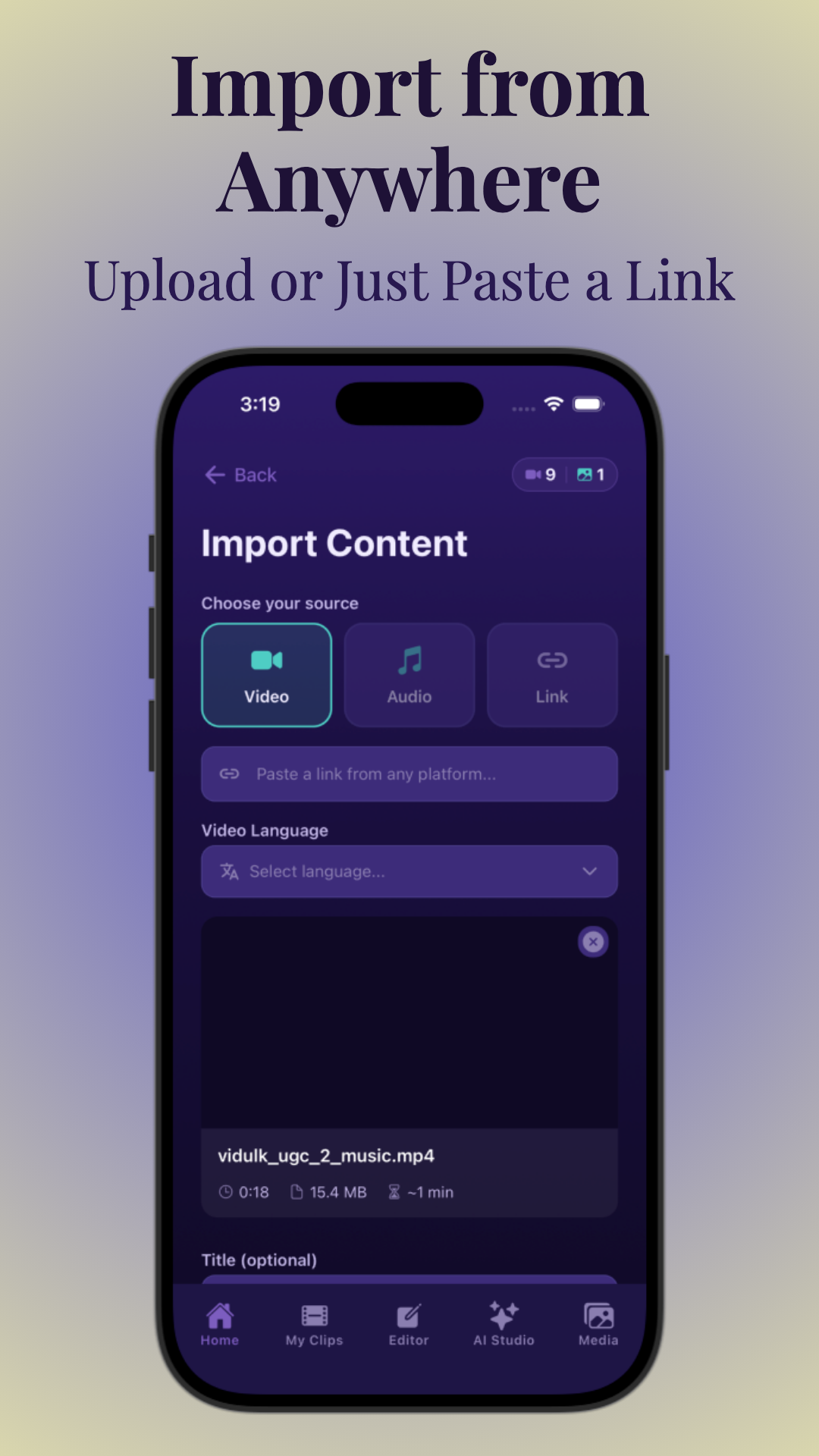
Efficient batch processing starts with seamless video import and organization. Today’s best AI video editing tools let you bulk upload from your device, paste YouTube or podcast links, or connect directly to cloud storage (Google Drive, Dropbox). Grouping your content into folders or batches makes the workflow manageable and reduces errors.
For example, Vidulk enables you to paste a podcast link or upload an entire season’s worth of video in one step. Many platforms also auto-detect file naming conventions and let you tag or sort clips before processing, which is essential for keeping content organized as you scale.
- Drag-and-drop or paste up to 100+ videos at once
- Auto-grouping by episode, guest, or topic
- Folder and metadata support for enterprise teams
3. Core Batch Operations: Captions, Trimming, Resizing, and More
The real magic of batch processing videos with AI tools comes from automating core repetitive editing steps. Top AI platforms can:
- Auto-caption video or add subtitles to video automatically for accessibility and engagement
- Trim intros/outros or dead space quickly across dozens of files
- Resize and crop (e.g., landscape to vertical) for reels, Shorts, and TikTok
- Watermark with your brand logo on every output
- Transcode and export in bulk to different formats (MP4, MOV, etc.)
- Upscale or enhance video quality using AI
For more on creating viral shorts, check out AI Clip Generator: Transform Long Videos Into Viral Shorts.
4. AI Generation: Creating Video Variants From Scripts, Prompts, and Templates
Modern AI video tools allow you to generate multiple video variants at once from scripts, prompts, or pre-made templates. This is essential for agencies or creators who want to test different hooks, intros, or formats for A/B testing or platform optimization.
Some platforms, including Vidulk, offer AI studios that interpret text prompts and turn them into video content or generate images for thumbnails and overlays. This means you can spin up a dozen versions of a single ad, promo, or social video in minutes—perfect for scaling reach and experimentation.
- Input a prompt/script to generate 10+ short video variants
- Leverage AI-powered templates for consistent branding
- Quickly adapt content for different platforms and audiences
5. Batch Clipping and Repurposing Long Videos Into Short Social Clips
One of the most powerful uses of batch processing is turning long-form videos into dozens of short, vertical clips for social media. AI auto-detects the best moments—funny quotes, highlights, or key takeaways—and instantly creates ready-to-post reels, TikToks, and Shorts.
This process, sometimes called AI video clipping, is a must-have for podcast and interview creators. Vidulk’s best AI clip generator workflow, for example, lets you paste a YouTube or Zoom link and receive a set of captioned, vertical clips in your inbox minutes later. For a deeper step-by-step, see How to Make AI Video Clips: A Step-by-Step Guide.
- Paste or upload long videos for instant, AI-driven clipping
- Auto-caption and format for each platform
- Generate multiple viral moments in one batch
6. Quality Control: Spot-Checking, Lip-Sync, and Consistency
Batch processing at scale means mistakes can multiply fast. That’s why the best AI tools for content creators include robust preview and quality control features. Before publishing, you can:
- Preview all batch outputs in a dashboard
- Spot-check for lip-sync and caption timing
- Review color, brightness, and branding consistency
- Flag and exclude poor-quality clips before export
Some platforms even provide AI-powered error detection for out-of-sync subtitles or bad crops. This is essential for agencies working at scale or brands maintaining strict standards.
7. Tool Comparisons: Batch Size, Speed, and Use Case
Not all batch AI video tools are created equal. Some are perfect for creators making 10–20 clips per week, while others are built for agencies or enterprises processing thousands a month. Key criteria to compare include:
- Batch size: How many videos can you process at once?
- Speed: Does the tool use cloud rendering or local processing?
- Supported formats: Can it handle podcasts, Zoom, YouTube, and more?
- Customization: Can you tweak captions, styles, and branding in bulk?
For a deep dive into differences, check out AI Video Clip Generator: Transform Long Videos with AI.
8. Automation and Integrations: APIs, Cloud, and Alerts
Serious scaling requires automation. The best AI batch editing tools offer APIs, cloud storage integrations, and even workflow automation like Slack or Teams alerts. This means you can trigger batch edits when a new video lands in a cloud folder or set up auto-publishing to your CMS or social platform.
Some platforms also offer dashboards for team collaboration and status tracking, making it easy for agencies or distributed teams to manage large volumes of content efficiently.
- Auto-import from Google Drive, Dropbox, or S3
- Integrate with Slack or Teams for alerts on batch completion
- API access for full workflow automation
9. Best Practices: Source Quality, Naming, and Test Batches
To get the most from batch processing videos with AI tools, follow these best practices:
- Start with high-quality source files: Avoid low-res, echoey, or poorly lit footage for best AI results
- Use clear naming conventions: Keep files and folders labeled by episode, guest, or topic for easy organization
- Run a small test batch: Preview outputs and tweak settings before running a full-scale job
- Document your workflow: Share settings and QA steps with your team to ensure consistency
For more tips on content creation workflows, see AI Intro Generator: Transform Your Video Content Creation.
10. Pricing and Scaling: Credits, Per-Video Billing, and Enterprise Features
Batch processing at scale comes with unique pricing considerations. Some AI tools charge per video, while others use credits or offer unlimited use with a subscription. For agencies or enterprise teams, look for bulk discounts, priority rendering, and SLA-backed uptime.
Distributed cloud rendering is a plus—it lets you process hundreds of videos simultaneously without waiting in line. Always calculate your estimated usage (clips per week, hours of footage) to choose the most cost-effective plan. Vidulk, for example, offers simple per-video pricing and unlimited plan options for heavy users.
- Review per-video vs. unlimited pricing models
- Check for enterprise features: priority rendering, team dashboards
- Look for transparent billing and no hidden fees
Conclusion
Batch processing videos with AI tools is transforming how creators, agencies, and teams scale their output. By automating tedious editing, clipping, and captioning tasks, you can turn hours of raw footage into dozens of viral-ready social clips in a fraction of the time. Whether you’re just starting or running a full production team, investing in the right batch AI workflow will supercharge your reach—and leave more time for creativity. Want to try the latest in AI video clipping and batch editing? Test out Vidulk and see how easy it is to go from long-form to viral in minutes.
FAQ
Q: What is batch processing in AI video editing?
A:
Batch processing in AI video editing refers to automating repetitive tasks—like clipping, captioning, trimming, and formatting—across multiple videos simultaneously. Instead of editing each video one by one, you can process entire folders or sets at once, saving massive time and ensuring consistency.
Q: Which AI tools support batch video editing or batch video generation?
A:
Popular tools include Vidulk, Descript, Wisecut, Pictory, and Kapwing. Each offers different batch capabilities, such as bulk importing, auto-captioning, and AI-driven clip generation. Vidulk is especially strong for creators needing fast, mobile-first batch workflows.
Q: How do I edit or enhance multiple videos at once with AI?
A:
Use an AI video platform that supports batch processing. Upload or link multiple videos, choose your editing settings (trims, captions, resizing), and let the AI process them in one go. Review outputs in a dashboard, spot-check quality, and export in bulk.
Q: Can AI batch process videos from a folder or cloud storage automatically?
A:
Yes! Many AI tools let you connect Google Drive, Dropbox, or S3 buckets and set up automatic batch imports. Some also support APIs for hands-free workflow automation.
Q: What are the best AI tools for turning long videos into multiple short clips in bulk?
A:
Vidulk, Pictory, and Wisecut are top choices for AI video clipping. They detect highlight moments, auto-caption, and format vertical clips for social media—all in batches.
Q: How do I keep quality consistent when batch processing videos with AI?
A:
Start with high-quality source files, use clear naming conventions, run small test batches first, and use tools with robust preview and spot-check features. Always review batches before publishing to catch any errors.



