
How to Make a Fake iMessage Video: The Complete Chat Story Video Guide
Learn how to make a fake iMessage video, craft viral chat story videos, add narration, and choose the best fake text message video maker for TikTok and more.

Estimated reading time: 13 min
Key Takeaways
- Fake iMessage videos are a viral format for storytelling, memes, and social proof on TikTok, YouTube Shorts, and Instagram Reels.
- Modern fake text message video makers offer deep customization—avatars, names, chat bubbles, timestamps, tapbacks, and more.
- AI-powered chat video generators like Vidulk streamline the process from script to video, including voiceovers and export for CapCut or TikTok.
- Choose between iMessage, WhatsApp, and other chat UIs to match your story's vibe and audience expectations.
- Step-by-step workflows help you turn a text script into a realistic, engaging chat story video—no editing skills required.
Table of Contents
- Section 1: What is a Fake iMessage Video?
- Section 2: Choosing Your Chat Style—iMessage, WhatsApp, and More
- Section 3: Scripting Your Chat Story for Maximum Engagement
- Section 4: Creating Your Fake Text Message Video—Step-by-Step Workflow
- Section 5: Customization Options—Avatars, Timestamps, and More
- Section 6: Enhancing with AI—Voiceover, Dialogue Generation, and Export
- Conclusion
- FAQ
Section 1: What is a Fake iMessage Video?
The Viral Format Explained
A fake iMessage video is a short-form video that visually mimics an iPhone text conversation, often used for storytelling, memes, or digital social proof. Creators use these videos on platforms like TikTok, YouTube Shorts, and Instagram Reels to share dramatic tales, Reddit story videos, or even staged DMs.
- Visually identical to the iOS Messages app, including features like blue and gray chat bubbles, familiar fonts (San Francisco), and the classic interface layout.
- Features real or fictional conversations, allowing for both original content and adaptations of trending internet stories, such as AITA (Am I The Asshole) threads or viral Twitter exchanges.
- Often includes chat bubbles, avatars, timestamps, and animated message flow, plus UI elements like "Delivered," "Read" receipts, and message reactions (tapbacks) for added authenticity.
Why Are Fake Chat Videos So Popular?
Fake text message video makers have exploded in popularity because chat stories are relatable, easy to follow, and ideal for mobile-first audiences. The illusion of a real conversation hooks viewers instantly, making it a go-to for viral content and storytelling. The format feels personal, as if viewers are peering into someone’s private life or witnessing drama unfold in real time, which triggers curiosity and emotional engagement.
- Simulates private drama or confessions (Reddit AITA, relationship stories), making them ideal for narrative storytelling and drama-based content.
- Memes and social proof ("leaked DMs")—creators can stage fake celebrity chats, influencer endorsements, or humorous exchanges to build credibility, parody trends, or poke fun at pop culture.
- Short, dialogue-driven content performs well algorithmically—platforms like TikTok and YouTube Shorts favor videos that grab attention quickly and retain viewers, both of which chat videos excel at.
Additionally, the format lends itself to a wide range of genres: comedy, suspense, horror, educational explainers, and even product marketing. The chat UI is a visual language nearly everyone recognizes instantly, reducing cognitive load and inviting immediate immersion.
From Screenshots to Full Videos
What started as fake iMessage screenshot generators has evolved: now, you can animate entire conversations, add voiceovers, and export in vertical video formats for TikTok. Modern tools even allow AI to generate dialogue and automate the editing process, lowering the barrier to entry for all creators.
For example, earlier tools allowed users to create static images of fake conversations, which were popular on Twitter and Instagram. However, as video platforms have taken center stage, creators now require dynamic content—animated message bubbles, typing indicators, and even simulated typing delays. Advanced platforms like Vidulk address these needs by offering not just static screenshots, but full-motion videos with customizable pacing, sound effects, and AI-generated voiceovers, making the process accessible for both casual users and professional storytellers.
Section 2: Choosing Your Chat Style—iMessage, WhatsApp, and More
Why the Chat UI Matters
The look of your fake chat video sets the tone. iMessage is the most common for English-speaking audiences, but fake WhatsApp chat video formats are popular globally—especially for international, meme, or tech-savvy viewers.
- iMessage: Classic blue/grey bubbles, iOS fonts, tapbacks, and "Delivered/Read" receipts. This style signals authenticity to iPhone users and is widely recognized in the US, UK, Canada, and Australia.
- WhatsApp: Green/white bubbles, profile pics, double-check read receipts (grey for delivered, blue for read), group chat look. WhatsApp is dominant in Europe, South America, India, and parts of Africa, making it the best choice for stories targeting global audiences or cross-cultural memes.
- Messenger/SMS: For niche or platform-specific stories. Messenger (with blue/white chat bubbles and sticker support) is ideal for Facebook-focused content, while generic SMS can evoke retro or "anonymous tip" vibes in true crime or investigative stories.
The choice of UI can subtly convey context—for instance, a heated group chat feels more urgent in WhatsApp, while a secretive 1-on-1 exchange feels intimate in iMessage. If your story is adapted from a Reddit thread, using iMessage may make it feel more like a real personal anecdote, whereas WhatsApp is better for family or international dramas.
Multi-Platform Generators
The best fake text message video makers let you pick your chat UI. Look for options that support:
- iMessage (iOS 17+ style, including updated tapbacks, larger emoji, and dark mode support)
- WhatsApp (Android/iOS look, group chat, and status indicators)
- Messenger, Discord, or custom chat templates (for gaming, fandom, or unique story settings)
This flexibility lets you match the "voice" of your story and make it instantly recognizable to your audience. For example, Discord chat style can be used for stories about gaming communities, while Messenger is better for family drama or school friend chats. If you're telling a story about a tech support scam, using WhatsApp or SMS can increase believability.
Export Formats: TikTok, CapCut, and Beyond
Choose a tool that exports in vertical (9:16) format, with options for TikTok, CapCut, and YouTube Shorts compatibility. See our guide to fake chat video creation with AI for more platform-specific tips.
Most social platforms favor vertical video, so your generator should offer high-resolution (1080x1920 or higher) exports. Some tools provide direct integration with editors like CapCut, allowing you to add transitions, sound effects, or overlays without extra steps. Look for features like seamless watermark-free export, adjustable video length, and the ability to split longer conversations into episodic clips for multi-part storytelling.
Section 3: Scripting Your Chat Story for Maximum Engagement
Turning an Idea Into a Chat Script
Before you open any app, sketch your story as a text script. Whether you’re adapting a viral Reddit story video or inventing a new drama, structure matters:
- Start with a "hook" line to grab attention (e.g., "You won't believe what happened at school today!")
- Alternate messages for natural pacing; each new message should push the story forward or reveal new information.
- Keep lines short and conversational—avoid large blocks of text, as viewers are more likely to skim or drop off with dense dialogue.
- End with a twist, reveal, or punchline that encourages shares or comments, such as a shocking confession, a funny misunderstanding, or a question to the audience.
You can use a free hook generator to brainstorm strong openers for your chat story videos. Good hooks not only grab attention but also set the tone and stakes immediately, which is crucial for high retention rates in short-form video.
Formatting Tips for Realism
- Mix single-line and multi-line messages to mimic the rhythm of real conversations. For example, a single sentence followed by a longer emotional message creates dramatic contrast.
- Use timestamps, emojis, and reactions to add personality and context. For example, "10:37 AM" timestamps can show the flow of time in a long conversation, and emojis can convey tone (e.g., 😱 for shock, 😂 for laughter).
- Insert system messages ("User is typing…", "Alex liked a message") for extra drama or to build suspense before a big reveal.
- Consider how misunderstandings, autocorrect errors, or abrupt message stops can make the chat feel more authentic and relatable.
Script Example: AITA Reddit Story
Alex: Hey, can I talk to you about something weird that happened today?
Casey: Sure, what’s up?
Alex: So I caught my roommate eating my food again…
Casey: Wait, AGAIN? Didn’t you talk to them last week?
Alex: Yeah, and they promised not to do it anymore.
Casey: Did you confront them this time?
Alex: I did, and they said they "forgot" whose food it was.
Casey: That’s so frustrating! Are you going to label everything now?
Alex: Thinking about it. Am I being too harsh if I get a mini fridge for my room?
Each turn fuels curiosity and makes viewers want to see the next message. A script like this immediately immerses viewers in relatable roommate drama, and the cliffhanger ending ("Am I being too harsh?") invites comments, increasing engagement. Once your script is ready, you’re set to build your fake text message video.
Tip: For longer stories, break them into three parts—setup, confrontation, and resolution. Each part should end with a hook to keep viewers watching your next video or following your account for updates. If you want a detailed walkthrough, check out our step-by-step guide to making a text story video.
Section 4: Creating Your Fake Text Message Video—Step-by-Step Workflow
Step 1: Choose Your Video Maker
There are several fake iMessage video makers, from browser tools to full-featured mobile apps. Some focus on screenshots, while others (like Vidulk) automate the entire video process with AI.
- Web-based generators: Quick, no install needed. Ideal for beginners or those wanting to test ideas rapidly. Examples include browser-based tools that let you paste your script and download a basic chat animation within minutes.
- Mobile apps: More features, AI tools, direct export. These often offer deeper customization, offline editing, and integration with your device’s photos and audio recordings. Look for apps with high user ratings and frequent updates for the best results.
- AI chat video generators: Automate dialogue, narration, and editing. Platforms like Vidulk use AI to generate dialogue from a prompt, automatically assign avatars and voices, and export videos formatted for TikTok or YouTube Shorts—saving hours of manual editing.
When choosing a tool, consider your goals: do you need speed, maximum realism, or deep customization? For creators posting regularly, automation and batch export features can be a game changer.
Step 2: Input or Paste Your Script
Paste your chat story script into the tool. Many platforms let you:
- Add speakers/names and avatars, ensuring each character is visually distinct. Some tools allow you to import contacts or use AI-generated faces for privacy and stylistic consistency.
- Set chat UI (iMessage/WhatsApp) to match your audience’s expectations or story context.
- Adjust message timing and order, letting you control the pace and flow of the conversation for maximum dramatic effect. For example, a rapid-fire exchange can build excitement, while long pauses (simulated with "typing…") add suspense.
Some advanced tools even offer AI auto-assign, where the system suggests voices, avatars, and chat styles based on your script’s tone or keywords.
Step 3: Customize and Animate
- Select avatars or generate them with AI. You can upload photos, use stock images, or let the app create unique faces that match your characters’ personalities. This step is key for group chats or stories with multiple participants.
- Set timestamps, read receipts, and emojis. Adjust timestamps to simulate real-time or spread a conversation over hours or days, adding narrative depth. Use read receipts to signal emotional beats (e.g., one character leaves the other "on read" after a dramatic message).
- Preview your animation—messages should appear in sequence with realistic timing. Fine-tune the entry speed of each message and test the pacing to ensure viewers can follow along without feeling rushed or bored. Add notification sounds for extra realism.
Step 4: Export and Edit
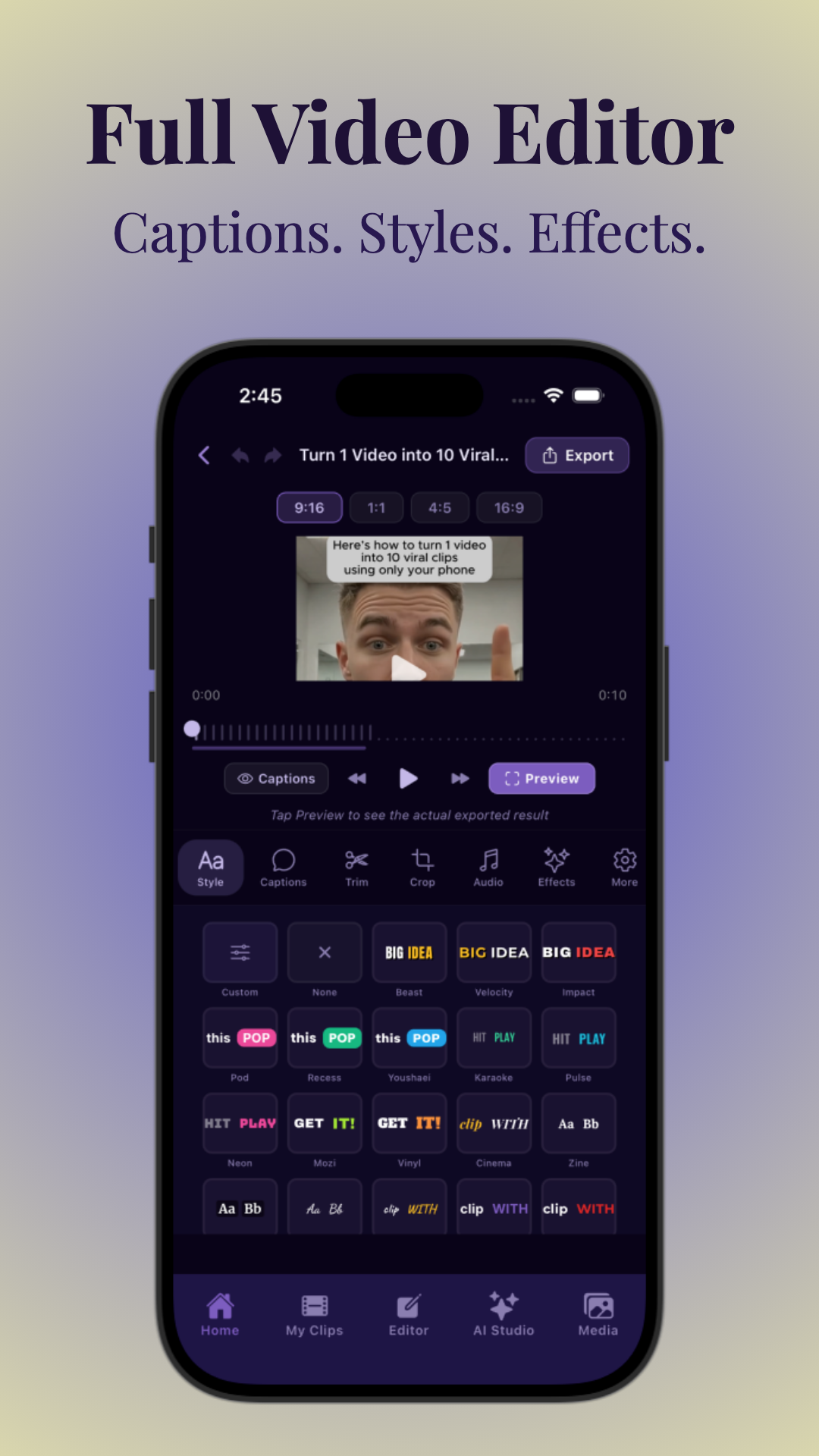
- Export as vertical video (9:16) for TikTok, Reels, Shorts. Choose high-resolution settings (up to 4K, if available) for crisp visuals on all devices.
- Optional: Add background music, captions, or voiceover in CapCut or your video editor of choice. Many creators overlay trending TikTok sounds or lo-fi music for mood, and add burned-in captions for accessibility and higher retention.
For end-to-end automation, Vidulk streamlines this workflow with AI-powered editing and direct export for social platforms. Advanced users can layer on additional effects, such as zoom-ins on key messages, emoji popups, or animated stickers to enhance storytelling.
Finally, review your final video side-by-side with real chat screenshots to catch any inconsistencies. This attention to detail can make the difference between a video that "goes viral" and one that feels obviously fake.
Section 5: Customization Options—Avatars, Timestamps, and More
Visual Tweaks for Maximum Realism
What separates a basic fake iMessage video from a viral, believable chat story video? Customization. Today’s chat story video tools let you fine-tune every detail:
- Names/Usernames: Set sender and recipient names to fit your story (e.g., "Mom," "BFF," or inside jokes). Consistency here helps maintain immersion.
- Avatars: Upload real photos or use built-in AI-generated images. Change profile pictures mid-chat to simulate real-life events (e.g., a character updates their photo after a breakup).
- Timestamps: Control when each message appears for continuity—spread over minutes, hours, or days to fit your plot. For example, add "Yesterday 11:42 PM" to show an overnight pause.
- Read Receipts: Show "Delivered", "Read", or "Typing…" indicators for added drama. A well-placed "Typing…" can build suspense before a big reveal.
- Tapbacks/Reactions: Use thumbs-up, hearts, or emoji reactions for realism. Mimic real iMessage reactions to add layers to the conversation—e.g., a heart on a comforting message, or a question mark on a confusing one.
- Dark/Light Mode: Match the look to your viewers’ device preferences. Switching modes can also be a stylistic choice to signal a change in mood or time of day.
Advanced Effects
- Group chats: Add multiple participants, different colors for each sender, and assign avatars for each. This is useful for stories about friend groups, family dynamics, or workplace drama. Some tools allow up to 10+ participants per group chat.
- Animated entry: Messages appear with a real-time typing effect. Set typing delays for each message to mimic the pace of real conversations, especially for dramatic pauses or misunderstandings.
- Sound effects: Message “ding” or notification sounds for immersion. Layer different sound cues for sent, received, and reacted messages. You can even include vibration effects or "message deleted" sounds if your tool supports them.
Additional options in advanced tools include adjusting bubble shapes, adding background gradients or wallpapers to match the story’s theme, and customizing font size for accessibility.
Editing Tips
For a pro look, keep fonts, spacing, and bubble colors consistent with real iOS or WhatsApp screens. Compare your preview to actual screenshots if unsure. For more on visual polish, read this guide to viral shorts production. If you're interested in making your chat story videos go viral, see our ultimate guide to viral fake text message videos.
Here’s a checklist for realism:
- Use accurate time formats (e.g., 12-hour with AM/PM, or 24-hour for international stories).
- Avoid overusing emojis or reactions—too many can break immersion.
- Keep background elements (like wallpaper or app bar) subtle and true to the platform you’re mimicking.
- Test your video on multiple devices before uploading to ensure colors and text are legible on both light and dark backgrounds.
Finally, always respect privacy and copyright when using avatars or profile pictures—use AI-generated faces or royalty-free images whenever possible.
Section 6: Enhancing with AI—Voiceover, Dialogue Generation, and Export
AI-Powered Features
The latest AI chat video generators do more than animate text—they help you:
- Auto-generate dialogue: Paste a summary or topic, and AI writes the chat story for you, complete with realistic character voices, pacing, and emotional beats. For example, enter "awkward breakup conversation" and the tool generates a believable exchange you can tweak.
- Voice narration: Add AI voices for each character, or upload your own audio. Choose from multiple voice options (male, female, various accents, and emotional tones like "excited," "nervous," or "angry").
- Automatic editing: AI detects the best moments, syncs captions, and highlights key lines for TikTok, ensuring your video is concise, engaging, and ready for social sharing.
Some tools even offer language translation, letting you instantly generate chat story videos in multiple languages for global reach.
Voiceover Workflows
Adding narration can double your video’s engagement. Most advanced tools let you:
- Assign a unique voice to each character (male/female, tone, accent), so viewers can easily follow group chats or distinguish personalities.
- Sync voiceover to message appearance for natural pacing—lines are read as each bubble appears, mimicking a real conversation.
- Export audio and video together—ready to post, with perfect synchronization between voice and visuals.
To maximize impact, adjust voice speed and pitch to match your characters’ ages and emotional states. Some platforms let you fine-tune pauses, add laughter or sighs, and even insert sound effects like door slams or background chatter for immersive scenes.
For creators who prefer their own voice, record dialogue for each character in separate tracks and upload them. Advanced editors can then merge these tracks, apply audio enhancement (noise reduction, EQ), and sync to chat bubbles automatically.
Export and Integration
Save your fake text message video as an MP4 or directly into CapCut/TikTok. Some apps offer integrations with editing suites, while others let you refine in-app. For creators seeking maximum automation, Vidulk’s AI Studio can enhance visuals and generate viral clips from long-form podcasts or interviews, as detailed in this in-depth tutorial.
Key export options to look for:
- High-resolution video (1080p+), vertical format (9:16) for TikTok, Reels, and Shorts.
- No watermarks or customizable branding for professional appearance.
- Direct upload to social platforms or export as project files for further editing in CapCut, Premiere Pro, or Final Cut.
- Ability to split long chats into multiple episodes, supporting serialized storytelling and maximizing audience retention.
Tip: Use AI-generated summaries and hashtags to optimize your video’s discoverability on TikTok and YouTube Shorts. Tools like Vidulk often suggest trending tags and video titles based on your script’s content and genre.
Conclusion
Fake iMessage videos and chat story formats have transformed short-form storytelling and viral content. With the right fake text message video maker, anyone can craft drama, memes, or even educational videos that feel fresh and authentic. Whether you want to animate a Reddit AITA story, create a fake WhatsApp chat for a meme, or adapt your own scripts, today’s AI tools—like Vidulk—make the process seamless from script to viral-ready video. Experiment with customization, voiceover, and export settings to find your unique style. For further reading, check out our guide on making AI video clips step-by-step and start turning your ideas into engaging chat story videos today.
As short-form video continues to dominate online platforms, mastering the art of fake chat video creation gives you an edge—enabling you to ride trends, spark conversations, and build a loyal audience. With tools like Vidulk, the barrier to entry is lower than ever: all you need is an idea, a script, and a few minutes to customize and export. Start experimenting, iterate on your storytelling, and see which formats resonate best with your community. Remember, the most shareable videos are those that feel both real and relatable—so focus on authenticity, attention to detail, and emotional hooks to ensure your chat stories stand out in a crowded feed.
FAQ
Q: How do I make a fake iMessage video?
A: Use a fake text message video maker or AI chat video generator. Paste your script, customize the chat UI (iMessage/WhatsApp), add avatars and timestamps, then export as a vertical video for TikTok or Reels. Tools like Vidulk automate much of the process and support AI voiceover. For a comprehensive walkthrough, see our ultimate guide to making fake text message videos.
Q: What app or website can create fake iMessage screenshots and videos?
A: Several apps and web tools exist. For screenshots, try browser-based generators. For full fake iMessage videos, use mobile apps or AI-powered platforms like Vidulk, which offer deep customization and easy export for social media.
Q: How do I make a fake text message story for TikTok?
A: Script your chat story, then use a fake text message video maker. Customize the look (names, avatars, chat style), add animation and voiceover, and export in 9:16 format. Upload the result to TikTok, often with trending background music or captions.
Q: Can I add voice narration to a fake iMessage video?
A: Yes! Modern chat video generators let you add AI-generated voiceovers or record your own. Assign different voices to each character and sync narration to the message flow for a professional, engaging result.
Q: How do I make a fake iMessage look realistic?
A: Pay attention to UI details: use authentic fonts, colors, avatars, timestamps, and reactions (like tapbacks). Match the pacing of real conversations. Preview your video next to a real iMessage screenshot before exporting.
Q: What’s the best fake text message generator for iPhone-style chats?
A: For full videos, look for apps supporting iMessage UI, vertical export, and AI features. Vidulk is a top pick for creators, offering advanced customization, voiceover, and automated editing for chat story videos.



