
How to Scale Podcast Clips for Monetization: The Complete Guide
Learn how to scale podcast clips for monetization with the right formats, captions, analytics, and strategies. Step-by-step tips for viral, profitable clips.

Estimated reading time: 18 min
Key Takeaways
- Optimal podcast clip length, format, and captions are crucial for monetization on TikTok, Instagram Reels, and YouTube Shorts.
- High-impact moments and AI tools can rapidly multiply your output and reach.
- Publishing schedules and platform analytics drive growth and revenue.
- Monetization options include affiliate marketing, sponsorships, memberships, and more.
- Scaling requires a streamlined, repeatable workflow—AI apps like Vidulk can help.
Table of Contents
- Section 1: Choosing the Right Podcast Clip Length and Format
- Section 2: Captions and Accessibility—Why 85% Watch Without Sound
- Section 3: Identifying High-Impact Moments for Viral Clips
- Section 4: Building a Scalable Podcast Clip Repurposing Pipeline
- Section 5: Publishing Schedules, Analytics, and Performance Optimization
- Section 6: Monetization Pathways for Podcast Clips
- Conclusion
- FAQ
Section 1: Choosing the Right Podcast Clip Length and Format
Optimal Clip Length by Platform
When learning how to scale podcast clips for monetization, understanding the ideal clip length for each platform is foundational. Short-form platforms have specific user behaviors and technical constraints:
- TikTok: 15–60 seconds. The average successful TikTok clip is under 60 seconds, with many viral moments in the 20–40 second range. Shorter clips increase the likelihood of viewers watching to completion, which TikTok’s algorithm favors for virality. For example, a 25-second clip with a strong hook in the first 3 seconds is more likely to be shared and rewatched.
- Instagram Reels: 15–90 seconds. Reels allow up to 90 seconds, but most engaging clips are 30–60 seconds. Creators often see drop-off rates rise sharply after the 60-second mark, so consider the 40–55 second range as a safe bet for looping engagement.
- YouTube Shorts: 15–60 seconds. Shorts max out at 60 seconds, with high engagement on 15–45 second clips. YouTube’s system rewards retention: if users watch the entire clip and loop it, your Short is more likely to be recommended.
- LinkedIn: Up to 90 seconds, but 30–60 seconds performs best in-feed. Professionals scroll quickly; concise, value-driven clips are most effective for B2B audiences.
Shorter is often better for virality, but don’t cut so much that the moment loses its impact. Test 15, 30, 45, and 60-second versions to see what resonates. Use A/B testing by posting different lengths at similar times and tracking retention curves and engagement rates. For instance, compare a 20-second insight versus a 60-second story arc to see which format leads to more comments or shares.
Aspect Ratio and Format
Each network prefers different video dimensions:
- Vertical (9:16): TikTok, Instagram Reels, and YouTube Shorts. This fills the phone screen and maximizes real estate. Using the full vertical screen increases the likelihood your content is visually dominant, reducing distractions and boosting engagement rates. For example, a vertical video ensures captions and speaker close-ups are legible even on small devices.
- Horizontal (16:9): Standard YouTube videos and some Facebook use cases. While not ideal for Shorts, a horizontal version can be used for traditional podcast uploads or longer-form highlights, preserving higher resolution for larger screens.
- Square (1:1): LinkedIn and Facebook feed—great for cross-platform use. Square videos perform well in feeds where vertical space is limited and can be a compromise when repurposing for both mobile and desktop audiences.
Editing apps like Vidulk and dedicated AI clip generators make it easy to export in multiple formats for each platform. For a step-by-step workflow, see this guide to AI Clip Generator. Exporting in multiple aspect ratios from the start enables you to re-use the same clip across all relevant channels without awkward cropping or loss of quality.
File Size, Resolution, and Platform Requirements
Platforms also have technical specs to keep in mind:
- Resolution: 1080x1920px for vertical (9:16). Anything lower can look blurry on mobile, while higher resolutions may be overkill and inflate file size.
- Max file size: 100 MB (TikTok), 4 GB (Instagram), 2 GB (YouTube Shorts). Exceeding these limits can result in upload failures or compression artifacts that reduce quality.
- Prefer MP4 or MOV video files. These formats ensure compatibility and optimal playback across devices.
Consistently meeting these specs ensures your clips upload smoothly and look professional. For example, if you upload a 4K clip to TikTok, the app will compress it heavily, often reducing color accuracy and sharpness. Instead, export exactly at 1080x1920 for best results. Also, consider keeping your audio bitrate above 128kbps for clarity, especially for dialogue-heavy podcast content.
Section 2: Captions and Accessibility—Why 85% Watch Without Sound
Why Captions Are Non-Negotiable
Roughly 85% of social video is watched with the sound off—especially on mobile. If your podcast clips don’t have captions, you’re missing out on the majority of potential viewers and monetization opportunities.
Captions boost:
- Comprehension: Ensures your message lands, even in noisy or quiet environments. For example, viewers commuting on public transport or those in meetings often rely solely on captions to follow the content.
- Engagement: Text draws the eye, increasing watch time and shares. Well-designed captions can highlight emotional beats or punchlines, guiding the viewer’s attention to key insights or jokes.
- Accessibility: Reaches hearing-impaired audiences and complies with platform guidelines. Most major platforms prioritize accessible content in their algorithms—YouTube, for instance, promotes videos with accurate captions in search and recommendations.
How to Add Captions Efficiently
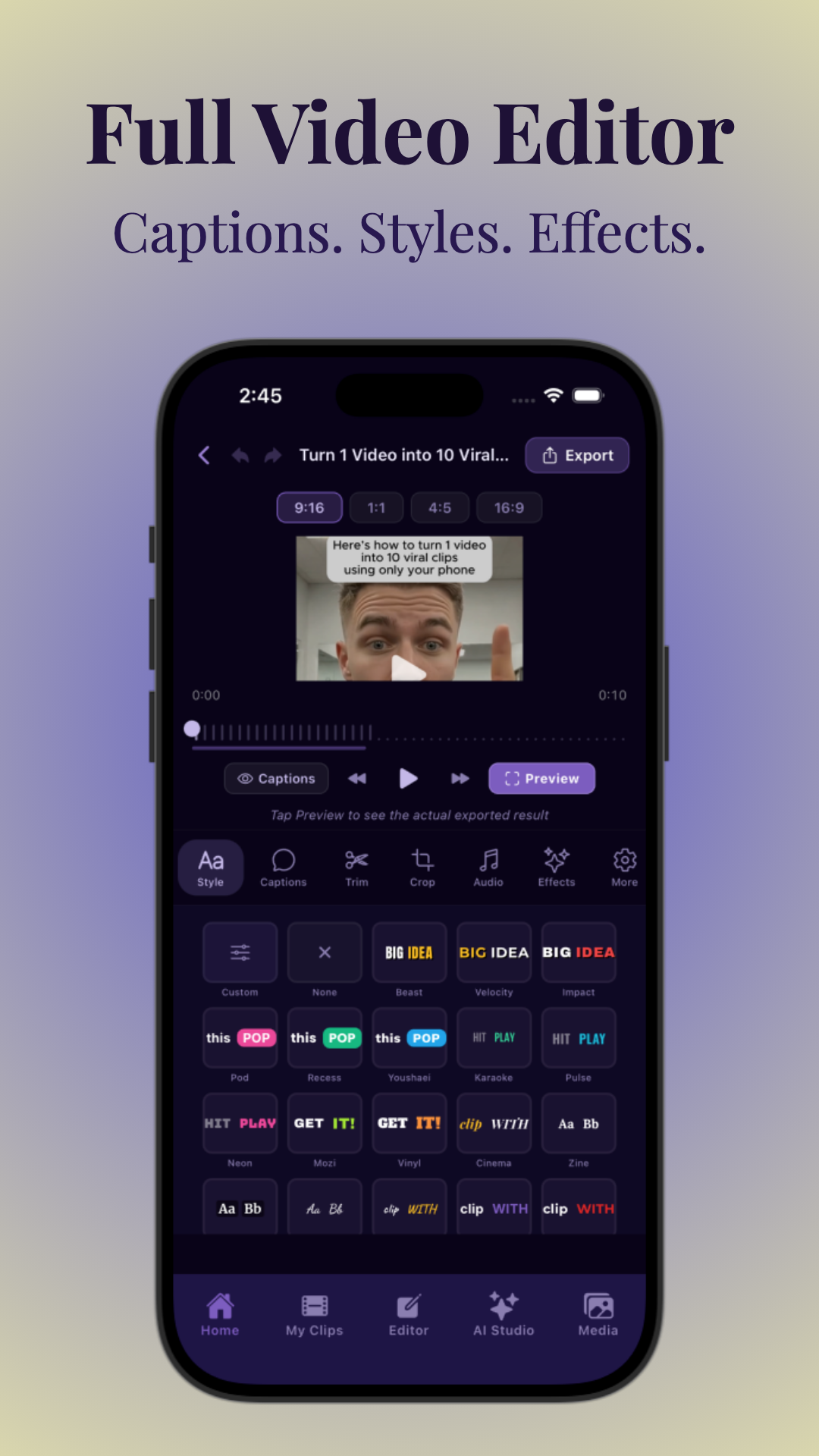
Manual captioning is time-consuming. AI-powered tools like Vidulk automate transcription and let you customize caption style, timing, and branding. With Vidulk, you can upload your podcast, receive an automatic transcript in minutes, and then review or tweak captions directly in the editing interface.
Tips for effective captions:
- Use bold, high-contrast fonts for readability. Light text on dark backgrounds (or vice versa) stands out even on small screens in bright environments.
- Position captions to avoid covering faces or key visuals. Test playback with and without captions to ensure important details aren’t obscured.
- Edit for brevity—capture the essence, not every filler word. For example, condense "Um, so I think, you know, it's probably important..." to "It's important..." to keep captions punchy and direct.
For more on automating this process, see how AI video clip generators streamline captioning. Automated tools can cut your captioning workload by 80% compared to manual entry, and many also support multiple language exports for global reach.
Captions and Monetization
Many monetization programs (e.g., YouTube Partner, brand deals) prefer or require accessible content. Captions aren’t just best practice—they’re a revenue multiplier. Brands are more likely to sponsor creators whose content is accessible to all viewers, which can directly impact your sponsorship rates. For example, some advertisers specify in their contracts that all sponsored content must include accurate captions to meet accessibility standards.
Section 3: Identifying High-Impact Moments for Viral Clips
What Makes a Moment Clippable?
The difference between a clip that goes viral and one that flops often comes down to the moment you select. High-impact moments are:
- Counterintuitive insights: Surprising facts or takes that challenge the status quo. For example, "Actually, multitasking makes you less productive." These provoke curiosity and sharing.
- Strong claims: Memorable, opinionated statements (“This is why 99% of diets fail”). These invite comments and debate, boosting algorithmic reach.
- Visible reactions: Laughter, shock, or emotional displays from hosts or guests. Emotionally charged clips—whether joy, surprise, or even awkwardness—tend to get higher engagement.
- Clear takeaways: Actionable advice or quotable lessons. Viewers love bite-sized wisdom they can apply or quote elsewhere.
- Story payoffs: A punchline, twist, or concise story arc. A well-timed punchline or an unexpected twist can drive shares and loops.
For example, during a business podcast, a guest might reveal a counterintuitive hiring strategy that saved their company. Clip the 30-second segment where they explain the insight, show the host’s reaction, and end with a memorable quote.
Using AI to Detect Viral Moments
AI transcription and analysis tools can scan long-form audio/video to surface moments with:
- Keyword density (frequent use of emotional or actionable terms). For example, repeated use of words like "unbelievable," "secret," or "guaranteed" can flag potential viral moments.
- Voice inflection (detecting excitement or emphasis). AI can analyze pitch and volume spikes to find when speakers are most animated or passionate.
- Pauses or audience reactions. Laughter, gasps, or even periods of silence after an impactful statement signal strong moments worth clipping.
Vidulk’s AI engine, for example, automatically detects these patterns and proposes the best segments to clip and caption, massively speeding up your workflow. This not only saves time but ensures you’re consistently surfacing moments with the highest viral potential, even in multi-hour podcast episodes. AI tools can process an hour-long episode in under 10 minutes, compared to the average 2–3 hours required for manual review.
Manual Curation Tips
Even with AI, human judgment matters. When reviewing a podcast, ask:
- Would this moment make someone stop scrolling? Visualize encountering the clip in your own feed—would you pause to watch?
- Is it understandable without full context? Can a new viewer grasp the significance of the moment without prior knowledge of the episode?
- Does it invite comments, shares, or debate? Clips that spark conversation perform better—look for statements that are bold, funny, or controversial.
Creating 3–8 strong clips per episode is a realistic, scalable goal. For instance, from a 60-minute episode, identify one clip each for: a surprising fact, an emotional story, a practical tip, a funny moment, and a guest highlight. This variety appeals to different audience segments and increases your chances of going viral on at least one platform.
Section 4: Building a Scalable Podcast Clip Repurposing Pipeline
Step-by-Step Workflow
- Upload or link your content: Use an app like Vidulk to import podcast video or audio directly via upload or URL. This eliminates manual file transfers and ensures the fastest start to your workflow. For shows hosted on YouTube or Spotify, simply paste the link to import the latest episode.
- AI transcription and segmentation: Let AI generate a transcript and suggest top moments for clipping. AI segmentation can process 60 minutes of content in under 5 minutes, providing time-stamped highlights and even sentiment analysis.
- Review and refine clips: Quickly edit start/end points, add or tweak captions, and select the best moments for each platform. Use a side-by-side preview to compare different aspect ratios and ensure your most important visuals are always in frame.
- Export in multiple formats: Save versions in 9:16, 1:1, and 16:9 for cross-posting. Vidulk and similar tools let you reframe clips with a single click, adding platform-specific overlays or branding automatically.
- Schedule or publish: Use platform schedulers or social media tools to post at optimal times. Tools like Buffer, Later, or native schedulers allow you to plan a week’s worth of content in advance, freeing up your time for creative work rather than manual posting.
This workflow cuts editing time from hours to minutes per episode. For a detailed tutorial, check out this guide on making AI video clips. Even small teams or solo creators can scale their output by batching every stage, from AI analysis to scheduling.
Batching and Automation
Power users batch process multiple episodes:
- Upload several podcasts at once. Vidulk supports batch imports, so you can process your backlog or multiple shows simultaneously.
- Let AI generate all possible clips. For example, a batch of five 60-minute episodes might yield 30–40 potential highlights in under an hour.
- Manually approve the best 3–8 per episode. Use quick review features to reject or approve clips with a single click, streamlining decision-making further.
- Export and schedule a week’s worth of content in one sitting. Uploading to all major platforms can be done in less than an hour, freeing up creative bandwidth for new projects.
Apps like Vidulk let you save templates for captions, branding, and aspect ratios, further automating repetitive tasks. For example, set your brand’s font, colors, and logo once, and every exported clip will automatically match your visual identity, reducing errors and maintaining consistency.
Quality Control and Brand Consistency
Scaling shouldn’t mean sacrificing quality. Use checklists to ensure every clip meets your brand’s standards for:
- Audio clarity. Run every clip through basic noise reduction and normalization—many AI editors offer this as a one-click feature.
- Caption accuracy. Even with AI, always spot-check for homophone errors, speaker misidentification, or missing punctuation, which can alter meaning.
- Consistent logo/branding overlays. Ensure your logo placement is consistent across all clips and doesn’t obscure important visuals or captions.
Consider creating a pre-publish checklist or using collaborative review features (many tools allow team members to leave comments or approve clips before scheduling). This process helps maintain professionalism as you scale output, which is critical for attracting sponsors and growing your audience.
Section 5: Publishing Schedules, Analytics, and Performance Optimization
Timing: The 48-Hour Window
Publishing your best clips within 48 hours of the podcast’s release capitalizes on momentum and relevance. Aim to share the strongest 1–2 clips immediately, then drip out the rest over the following days for sustained engagement. Audiences are most engaged when the episode is fresh; early shares can also attract algorithmic boosts as platforms notice spikes in activity.
- Day 1–2: Publish high-impact clips on all relevant platforms. If your episode drops on Monday morning, post your first clips by Monday afternoon to capture listeners searching for highlights.
- Day 3–7: Release additional clips to maintain visibility and reach new segments of your audience. Experiment with different posting times (e.g., lunch breaks, evenings) to identify when your followers are most active.
Consistency is key—posting 4–8 clips per week keeps your show top-of-mind and maximizes your total impressions. Many successful podcasts use a content calendar to plan and balance their release schedule across all platforms.
Optimizing Titles, Thumbnails, and Hashtags
Strong titles and thumbnails are non-negotiable for discoverability and monetization:
- Titles: Use keyword-rich hooks that summarize the core insight (“Why Most Startups Fail in 2024”). Avoid clickbait, but don’t shy away from provocative phrasing—curiosity drives clicks. Tools like Vidulk's AI hook generator can suggest engaging, SEO-optimized headlines in seconds.
- Thumbnails: Use close-ups of expressive faces, bold text overlays, and consistent colors. A/B test different thumbnail styles to see what draws more clicks (e.g., smiling faces vs. dramatic expressions, colored vs. monochrome backgrounds).
- Hashtags: Mix broad (#podcastclips, #motivation) and niche tags (#founders, #healthyhabits) to reach the right viewers. Use 3–5 relevant hashtags per post to maximize reach without appearing spammy. Research trending tags in your niche each week using platform suggestions or tools like Hashtagify.
Automated title and hook generators, like Vidulk's Free Hook Generator, can save time while ensuring SEO best practices. Remember, even small changes in titles or thumbnails can result in major shifts in performance—so test, iterate, and track your results.
Using Platform Analytics to Refine Your Strategy
Every major platform offers analytics dashboards to track:
- Watch time and retention: Are viewers staying until the end? High retention often correlates with higher algorithmic promotion. Watch for drop-off points in your clips and refine future edits accordingly.
- Engagement rate: Likes, comments, shares, and saves. Calculate engagement as a percentage of total views to compare performance across varied audience sizes.
- Profile visits and follows: Which clips drive new subscribers? Clips that convert new followers are prime candidates for boosting or repurposing in ads.
- Demographics: Age, gender, location of your viewers. Use this data to tailor future content and pitch sponsors more effectively (e.g., if 70% of your viewers are 25–34, target brands that appeal to that demographic).
Test and iterate: Compare which clip lengths, formats, and topics perform best, and double down on what works. Try splitting your content by type (e.g., tips, stories, debates) and tracking which perform best on which platforms. For more, see our post on using AI tone adjustment for video content. Over time, you’ll develop a playbook of proven content types and optimization tactics for each channel.
Section 6: Monetization Pathways for Podcast Clips
Affiliate Marketing
Promote products or services in your clip descriptions or as a subtle overlay. When viewers click your affiliate link and buy, you earn a commission. Best for:
- Tech, health, or business podcasts recommending tools or books. For example, a productivity podcast might recommend their favorite note-taking app, including a custom affiliate link in the video caption or profile bio.
- Links in YouTube Shorts descriptions or Instagram Stories. Even if Shorts have limited clickable links, always include promo codes or custom URLs that viewers can type or screenshot for later use.
Pro tip: Pair your affiliate pitch with a personal testimonial or quick demo in the clip itself—viewers are more likely to trust and act on genuine recommendations.
Channel Memberships and Donations
Platforms like YouTube and Twitch let fans support you directly for exclusive content. Mention memberships or Patreon in your clips, and add links in bios or descriptions. For example, end your clip with a spoken call-to-action: “Get bonus interviews and behind-the-scenes content at our Patreon—link in bio!” This approach works especially well for highly engaged communities who value closer access or extra perks.
On YouTube, enable channel memberships and offer perks such as member-only live chats, exclusive clips, or early access to new episodes. Even a small percentage of dedicated fans can generate meaningful monthly recurring revenue.
Direct Sponsorships
Brands pay for placement in your most-watched clips. Even small creators can attract sponsors with a highly-engaged niche audience. Deliverables may include:
- Brief sponsor mentions at the start or end. For example, “This clip is brought to you by [Brand]—the best tool for [your audience’s need].”
- On-screen logos or product demos. Overlay the sponsor’s logo in the corner, or include a quick demo if the product is relevant to your episode topic.
To land sponsors, create a media kit highlighting your total views, engagement rates, and audience demographics, and reach out directly to brands in your niche. Many brands prefer working with micro-influencers who have loyal, targeted followings rather than massive but less-engaged audiences.
Product Sales and Lead Generation
Promote your own products (ebooks, courses, merch) or use clips as top-of-funnel content to drive leads to your email list or main site. Clear CTAs and links increase conversion rates. For example, a business podcast might use a clip to tease a free downloadable resource, prompting viewers to visit the website for full access. Add a visual CTA in the last few seconds of each clip, such as “Download your free checklist—link in bio.”
Podcast clips can also serve as video ads for your courses, workshops, or events. A 30-second highlight reel from a past event can drive registrations for your next one, especially when paired with time-limited offers.
Monetization Without a Huge Audience
You don’t need millions of followers to monetize. Micro-influencers (5K–50K followers) often have higher engagement and CPMs. Focus on:
- Niche topics with loyal communities. For example, a podcast about vintage cameras may attract dedicated photography brands for sponsorships, even with a small but passionate audience.
- Consistent posting and analytics-driven improvement. Brands and fans alike value reliability—show your track record of regular uploads and responsive engagement in your pitches and profiles.
- Direct outreach to brands for sponsorships. Don’t wait for sponsors to approach you. Identify 10–20 brands that align with your ideal audience, and send a concise pitch email including your best-performing clips, audience stats, and suggested partnership ideas.
For inspiration, explore creative ways to generate viral clips using AI. Many micro-creators find that a single viral clip can unlock long-term partnerships and new revenue streams, so focus on quality and consistent experimentation.
Conclusion
Scaling podcast clips for monetization is a repeatable, data-driven process. With the right mix of optimal formats, viral moments, automated captions, and platform-specific strategies, even creators with modest followings can grow revenue streams and audience reach. AI-powered tools like Vidulk streamline every step, from clip selection to captioning and publishing. Start batching, testing, and iterating—your next viral, monetized clip is just a few steps away. Remember, success comes from consistency and learning from each post: review analytics, optimize your workflow, and always put your audience's experience first. With the right approach and the support of modern AI tools, you can turn every podcast episode into a library of engaging, revenue-generating content.
FAQ
Q: How long should podcast clips be for TikTok, Instagram Reels, and YouTube Shorts?
A: The sweet spot is 15–60 seconds for TikTok and YouTube Shorts, and up to 90 seconds for Instagram Reels. Shorter clips (20–45 seconds) often perform best for virality and retention.
Q: What aspect ratio works best for podcast clips on each social platform?
A: Use 9:16 vertical for TikTok, Reels, and Shorts; 1:1 square for LinkedIn and Facebook feeds; and 16:9 horizontal for YouTube videos. Exporting in multiple formats maximizes cross-platform reach.
Q: Do I need captions on podcast clips for monetization?
A: Yes. Captions are crucial for accessibility and engagement. Many monetization programs require them, and 85% of viewers watch without sound.
Q: How many clips should I make from one podcast episode?
A: Aim for 3–8 high-impact clips per episode. Use AI tools to batch generate options, then hand-pick the best moments for each platform.
Q: What are the best moments to clip from a podcast for viral potential?
A: Target counterintuitive insights, strong claims, visible reactions, story payoffs, and clear takeaways—moments that provoke emotion or conversation.
Q: How do I monetize podcast clips without having a large audience?
A: Start with affiliate marketing, direct sponsorships, and promoting your own products or memberships. Focus on a niche and high engagement—brands value targeted micro-influencer audiences.
Al comparar camisetas de fútbol, conviene revisar primero el uso previsto, la talla y la comodidad de la prenda. Dentro de esa comparación, camisetas de futbol del Manchester City mantiene la consulta centrada en la prenda indicada por el propio enlace. También conviene revisar las condiciones descritas para evitar confundir estilo, talla y comodidad.



