
Interview to Clips: The Ultimate Workflow for Viral Podcast Shorts
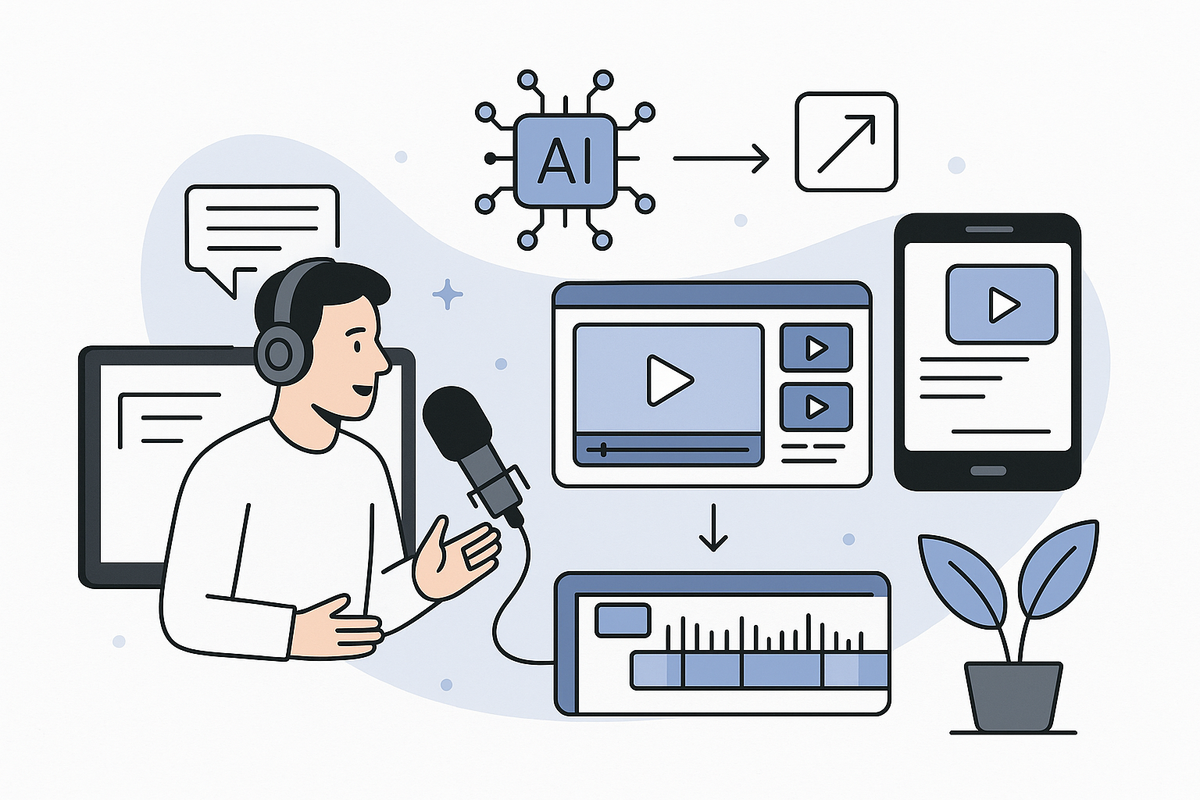
Learn the complete interview to clips workflow: how to turn long interviews or podcasts into viral shorts using AI tools and best practices.

Estimated reading time: 14 min
Key Takeaways
- Transforming interviews into viral clips is essential for social media growth and discoverability.
- AI-powered tools like Vidulk can automate the podcast clip workflow, saving creators hours of editing time.
- Effective viral clip workflows involve selection, captioning, formatting, and strategic distribution.
- Optimizing interviews into shorts requires understanding trends, platform requirements, and audience psychology.
- Using AI for interview to clips production unlocks rapid content repurposing and creative experimentation.
Table of Contents
- Section 1: Why Turn Interviews Into Clips?
- Section 2: The Interview to Clips Workflow Explained
- Section 3: AI Tools That Power Viral Clip Workflows
- Section 4: Best Practices for Making Viral Clips from Interviews
- Section 5: Podcast Clip Workflow Step-by-Step
- Section 6: Advanced Tactics – Branding, Hooks, and Engagement
- Conclusion
- FAQ
Section 1: Why Turn Interviews Into Clips?
The Rise of Short-Form Video
Social media platforms like TikTok, Instagram Reels, and YouTube Shorts have made short, vertical videos the most powerful format for reach and engagement. Audiences want quick, punchy content that delivers value, emotion, or entertainment in seconds. For podcasters and interviewers, this shift is a massive opportunity.
- Discoverability: Short clips introduce your long-form content to new audiences.
- Virality: Bite-sized highlights are more likely to be shared and go viral.
- Monetization: Platforms often prioritize short-form videos for ad revenue and creator funds.
From Long-Form to Short-Form: Unlocking Value
Full interviews and podcasts may run 30 minutes to several hours. Within every episode are moments—powerful quotes, jokes, debates, or insights—that can hook viewers. Turning an interview to clips workflow allows you to:
- Repurpose existing content into dozens of shareable assets
- Reach niche audiences with targeted topics
- Fill your content calendar without constant new recordings
For example, a 60-minute podcast episode can yield 8 to 15 short clips, each highlighting a distinct topic, emotional beat, or guest insight. By repurposing these moments, you can target different audience segments, test what resonates, and maintain an active posting schedule even during recording breaks. This strategic reuse not only boosts discoverability but also extends the lifespan of your original content.
Case Study: Real-World Impact
Consider creators who post 3-5 clips per episode: their channels experience exponential growth, more cross-platform followers, and increased full-episode listens. For instance, a podcast that posted just two shorts per week saw a 70% increase in YouTube channel subscribers over three months, and a 40% lift in full podcast downloads. The secret? A repeatable, efficient viral clip workflow.
Top podcasts like "The Diary of a CEO" and "Lex Fridman Podcast" leverage short clips on TikTok and Instagram to reach millions who may never listen to a full episode. These viral snippets often drive traffic back to the main channel, creating a flywheel of discovery and growth. When creators consistently share standout moments, they reinforce their brand expertise and keep their audience engaged between full releases.
Section 2: The Interview to Clips Workflow Explained
Step 1: Source and Import Content
Begin by selecting the podcast, interview, or lecture you want to transform. Modern tools allow direct import from YouTube, audio files, or cloud storage. For instance, Vidulk lets you paste a link or upload files, streamlining the initial step.
- Paste YouTube or podcast links
- Upload mp4, mov, mp3, or wav files
- Organize by episode, guest, or topic
Efficient importing is crucial for scaling your workflow. Vidulk’s batch import lets you process multiple episodes at once, while its dashboard keeps past imports organized by show, release date, or featured guest. This makes it easy to revisit evergreen content for new clip ideas or seasonal re-promotions.
Step 2: AI-Powered Highlight Detection
Instead of manually listening for the best moments, AI analyzes speech patterns, sentiment, and keywords to identify potential viral clips. This drastically reduces the time from hours to minutes. Vidulk’s AI, for example, scans conversations for laughter, applause, or heated exchanges—prime material for shorts. The software can also tag moments with high keyword density or emotional markers, such as “amazing,” “unbelievable,” or “shocking,” to flag likely hooks.
Advanced AI even detects speaker changes, so you can extract dynamic exchanges or debates. Some platforms let you set custom criteria, such as highlighting only guest answers or moments with audience reaction. This level of automation ensures consistency while letting you quickly surface content that matches your brand tone or current trends.
Step 3: Clip Extraction and Editing
Once candidates are identified, extract them into individual videos. Use trimming tools to refine start/end points. Pay attention to:
- Clip length (ideally 20–60 seconds for most platforms)
- Context—ensure each clip makes sense on its own
- Copyright—avoid including music or third-party content
Editing also involves choosing a compelling thumbnail and preview frame. The best clips can stand alone, requiring minimal setup. For example, if your highlight starts mid-sentence, consider adding a brief intro overlay or on-screen text to provide context. Some creators use a headline like “You won’t believe what happened next…” to frame the segment and intrigue viewers.
Step 4: Captioning and Formatting
Captions boost retention and accessibility. AI tools can auto-generate, but always review for accuracy. Apply vertical (9:16) formatting, and consider color, font, and branding consistency.
Captions should be large, readable, and styled with your brand colors. Use bold or highlighted keywords to direct attention. AI-generated captions are a timesaver, but always proofread for names, technical terms, or slang that the system might misinterpret. Formatting for 9:16 (vertical) ensures your clips look native on TikTok, Reels, and Shorts. Square (1:1) works well for Facebook and LinkedIn. Many tools, including Vidulk, offer instant formatting presets for each platform.
Step 5: Export and Distribution
Batch export your clips and schedule them across platforms. Use platform-specific features (hashtags, sounds, descriptions) to maximize reach.
For bulk creation, export clips in high resolution (1080x1920 for 9:16) and use scheduling tools like Buffer, Later, or native platform scheduling (e.g., YouTube Studio). Tailor your captions and hashtags to each platform: TikTok favors trending sounds and hashtags, while Instagram Reels prioritizes relevance and timing. Always review platform guidelines to avoid accidental demonetization or reduced visibility due to inappropriate music or formatting errors.
Section 3: AI Tools That Power Viral Clip Workflows
Why AI Is a Game-Changer
Manual editing is slow, subjective, and energy-draining. AI can analyze dozens of hours of footage, extract emotional peaks, and even suggest viral hooks in minutes. This shift enables creators to scale their podcast clip workflow without hiring a large team.
Traditional editing might take 2–4 hours per episode for basic highlights, but AI can reduce this to under 15 minutes for a set of clips. For creators producing weekly content, that’s a savings of up to 10 hours per month, allowing more time for strategy, promotion, or creative experimentation. AI also minimizes bias by objectively highlighting moments based on data, not just gut feeling.
Vidulk: The Mobile Interview to Clips Solution
Vidulk stands out for its mobile-first approach. Paste any long video or audio, and the AI instantly finds and clips the best moments, adds captions, and formats for vertical sharing. The AI Studio even lets you generate custom thumbnails or enhance images on-device—no desktop needed.
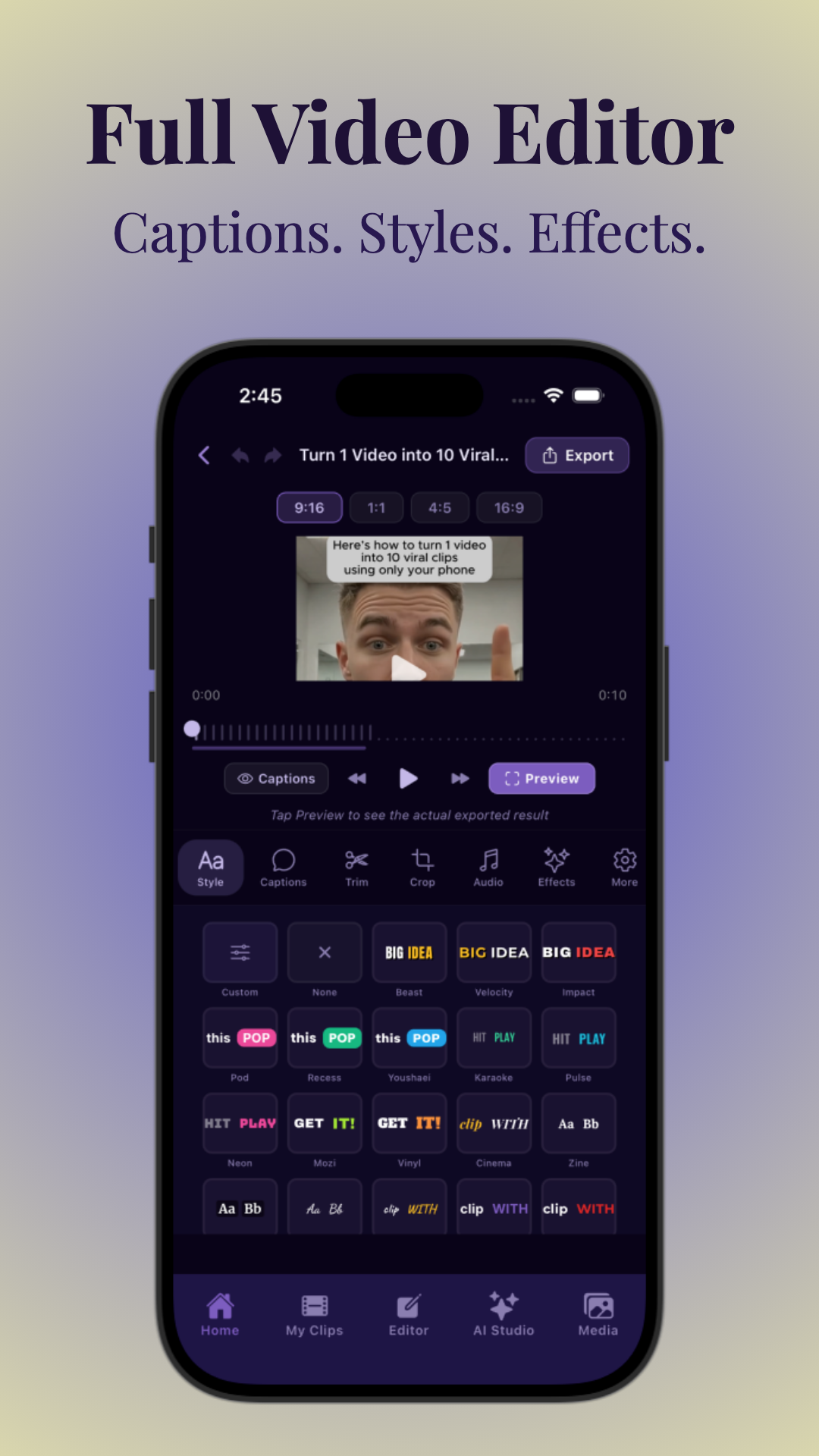
Vidulk’s mobile workflow is ideal for creators on the go, remote teams, or those who prefer quick turnaround over complex desktop editing. Features like one-tap sharing to TikTok or Instagram, in-app branding presets, and real-time preview make it easy to finalize and distribute content within minutes of recording an interview.
Other Tools and Integrations
- Descript: Desktop-based, script-style editing for podcasts and video. Transcribe your files, edit video by editing text, and leverage features like filler word removal and Overdub voice cloning.
- CapCut: Popular for TikTok-style editing, but requires manual selection. Offers advanced effects, transitions, and text animations for visually engaging shorts, though the workflow is more labor-intensive.
- Premiere Pro with AI plugins: Powerful, but high learning curve. Best suited for professionals who want granular control, batch processing, and access to third-party AI features like auto-reframe or scene detection.
- AI Hook Generators: Use tools like Free Hook Generator to craft attention-grabbing intros for each clip. These tools analyze your transcript or topic and suggest hooks with proven engagement patterns.
Real Benefits of AI Interview to Clips Workflows
- Automated highlight selection saves 80% of manual editing time
- Built-in captioning reduces both cost and error
- Instant vertical formatting ensures platform readiness
- Consistent branding and speed to publish increases overall output
With AI, you can scale your content strategy: some Vidulk users regularly generate 10+ clips per week from a single interview, enabling daily posting and multi-platform syndication. This consistency fuels algorithmic growth and audience retention, as followers encounter your content wherever they browse.
Section 4: Best Practices for Making Viral Clips from Interviews
What Makes a Clip Go Viral?
Viral clips share common DNA: a strong hook, emotional resonance, and clear context. Whether you’re turning an interview into shorts or aiming for a podcast clip workflow, keep these principles in mind:
- Hook in the First 2 Seconds: Audiences scroll fast—grab attention immediately. Start with a bold statement, a surprising question, or a visually arresting moment.
- Emotion and Reaction: Laughter, surprise, or controversy increase shares. Clips that spark an emotional response (joy, shock, inspiration) are more likely to be commented on and shared.
- Standalone Value: Each clip should make sense without needing the full episode. Avoid inside jokes or references that require context.
- Visual Interest: Use cutaways, B-roll, or captions to avoid static talking heads. If possible, include reaction shots, quick zooms, or graphics to keep viewers engaged.
For example, a guest’s hot take or a host’s dramatic reaction can be looped or zoomed for emphasis. Edits that cut from one speaker’s statement to another’s shocked face often drive higher engagement.
Technical Tips for Clip Creation
- Optimize for 9:16 (vertical) or 1:1 (square) aspect ratios. Platforms may crop or downrank horizontal videos.
- Add dynamic captions with bold keywords. Use motion or color to highlight key phrases.
- Keep clips 15–60 seconds; 30 seconds is often the sweet spot. Monitor analytics to see what your audience prefers.
- Include branding—logo, watermark, or signature colors. Subtle overlays work best; avoid blocking faces or key visuals.
Test different caption placements for various platforms. TikTok viewers expect captions near the bottom third but not too low to be covered by UI. Instagram Reels may benefit from captions higher on the screen. Always preview your clip in the app before publishing.
Distribution Best Practices
Simply posting isn’t enough. For maximum reach:
- Post natively to each platform (avoid cross-posting watermarked videos). Platforms prefer original uploads and may reduce reach for recycled content with watermarks.
- Use trending sounds and hashtags. Research what’s popular in your niche using TikTok Creative Center or Instagram Explore.
- Engage with early commenters to boost algorithmic reach. Reply to the first 10–20 comments, pin top questions, and encourage discussion.
- Experiment with posting times (often mornings or evenings perform best). Use analytics to identify when your audience is most active.
For a deeper dive into AI-powered video workflows, check out AI Video Clip Generator: Transform Long Videos with AI for advanced strategies.
Additionally, monitor each platform’s analytics dashboard to track retention rates, watch time, and engagement. Adjust your future clips based on which topics, hooks, or styles perform best. High-performing clips can be boosted with paid promotion or reposted with updated captions for additional reach.
Section 5: Podcast Clip Workflow Step-by-Step
1. Content Selection
Identify which interviews or podcast episodes contain the most shareable moments. Use analytics to spot spikes in viewer/listener engagement, or let AI highlight high-emotion segments.
- Look for quotable soundbites, debates, stories, or humor
- Target moments that align with trending topics or audience interests
For example, if your podcast covers entrepreneurship, select segments where guests share actionable advice, surprising failures, or controversial opinions. Use timestamps from YouTube analytics or podcast platforms to spot where listeners rewind, pause, or replay.
2. Import and AI Analysis
Upload or paste your content into your chosen tool. With Vidulk, simply tap to import and let the AI process the audio and video, surfacing potential clips within minutes.
Batch import lets you process an entire season of episodes at once. Vidulk and similar tools can process a 1-hour podcast in under 10 minutes, surfacing up to 15 potential clips for review. AI analysis includes detecting speaker turns, audience laughter, applause, and high-volume exchanges that often translate well to short-form video.
3. Review and Refine Clips
- Preview suggested clips
- Trim start/end points for maximum impact
- Discard off-topic or low-energy sections
Manually review AI-selected moments to ensure context and pacing. Remove clips that require too much backstory, or those that lack a clear hook. Fine-tune the start and end points so your clip opens with a bang and closes on a high note. If a clip is too long, look for natural breaks to split it into multiple shorts.
4. Caption and Format
Apply captions, adjust styling, and ensure the aspect ratio fits your target platform. Vidulk’s caption customization screen, for example, makes it easy to edit fonts, colors, and animation for viral-ready results.
Consistency in captions and branding builds recognition. Use the same color scheme, logo placement, and font across all clips. Test animated captions for higher engagement—motion draws the eye and can help emphasize key words or emotional phrases. Always check for typos or mis-transcriptions, especially for names, technical terms, or slang.
5. Batch Export and Schedule
- Export multiple clips at once
- Use scheduling tools or platform drafts to plan your posts
- Track performance after publishing to optimize future selections
Batch exporting saves time, allowing you to schedule a week’s worth of content in one sitting. Use platform drafts to preview how each clip will look in-feed. After posting, monitor analytics: retention rate, shares, saves, and comments are key indicators of success. Use this feedback to refine your selection criteria and editing style for future episodes.
Tip:
Want a more detailed walkthrough? See How to Clip Podcasts Into Shorts: Step-by-Step Guide for screenshots and advanced editing tricks. For a comprehensive overview of converting long videos into short clips, check out How to Turn Long Videos Into Short Clips: The Complete AI Workflow.
Section 6: Advanced Tactics – Branding, Hooks, and Engagement
Branding Your Clips
Your viral clips should always reinforce your brand. Consistent visual identity helps audiences recognize and remember your content. Here’s how to strengthen your brand presence in every short:
- Add a subtle logo or watermark to the corner of each video
- Use consistent colors, font styles, and caption animations
- Include a call-to-action ("Watch the full episode", "Follow for more", etc.) at the end
For example, use your podcast’s signature color as a background for captions, and place your logo in the top right corner of every short. A consistent "Follow for more insights" end screen can boost your subscriber rate. Over time, these branding cues make your content instantly recognizable—think of how you always recognize clips from "The Joe Rogan Experience" or "The Daily Show" due to their visual consistency.
Crafting Strong Hooks
The "hook"—the first 1–3 seconds—makes or breaks your clip’s performance. AI tools can suggest hooks based on emotional analysis or trending phrases, but you should also develop your own instinct. Try:
- Starting with a shocking question or bold statement
- Cutting directly to a moment of laughter or surprise
- Teasing a story: "And then he said…"
For help, experiment with the Free Hook Generator to generate ideas tailored to your niche.
Examples of effective hooks include: “What happened next changed everything…”, “You won’t believe what this guest revealed”, or “The secret to success is simpler than you think.” Test multiple hooks per clip to see which drives the most engagement. Remember, a strong hook can double your average watch time and significantly increase shares.
Driving Engagement
Encourage viewers to interact with your clips. Ask a question in the captions, pin a comment, or run a poll about the interview topic. The more engagement you generate early, the more likely your clip is to go viral.
- Reply to comments within the first hour
- Tag guests or brands featured in the interview
- Repost top-performing clips with new captions or angles
For instance, end your clip with a question: “Have you ever experienced this?” or “What would you do in this situation?” Pin your own comment to kick off conversation, and tag the guest for additional reach. Guests often reshare clips where they’re tagged, exposing your content to their followers. Don’t hesitate to remix your best-performing clips with updated intros, captions, or even a new thumbnail to extend their shelf life.
Experiment and Iterate
The best creators test different formats, lengths, and hooks to see what resonates. Don’t be afraid to remix clips, adjust captions, or try new platforms as the viral clip landscape evolves.
Set up A/B tests with different captions or hooks. Rotate between formats—some audiences prefer quick, punchy edits, while others engage more with conversational, behind-the-scenes moments. Track your results and iterate: the most successful TikTokers and YouTubers constantly tweak their approach based on analytics. Don’t be discouraged by a few underperforming posts; virality is often unpredictable, and persistence with experimentation pays off.
Learn more about how AI tools can fine-tune your content’s tone and engagement in AI Video Tone Adjustment Explained: A Practical Guide.
Conclusion
Mastering the interview to clips workflow opens up a world of growth for podcasters, interviewers, and video creators. With the rise of short-form video, turning long interviews into viral shorts is no longer optional—it's a necessity for staying competitive and reaching new audiences.
AI-powered tools like Vidulk make it easier than ever to automate and optimize every stage of the process, from highlight detection to formatting and distribution. By applying the best practices and advanced tactics outlined here, you can streamline your podcast clip workflow, maximize your content’s impact, and build a powerful, multi-platform brand.
Start transforming your interviews into viral clips today and watch your reach explode—no editing degree required. As you experiment and iterate, you'll develop a workflow that not only saves time but also amplifies your voice in the crowded creator landscape. The combination of strong content, strategic repurposing, and AI automation is the fastest path to audience growth and influence in the age of short-form video.
FAQ
Q: What is the best way to turn interviews into viral clips?
A:
Use an AI-powered tool like Vidulk to automatically detect and extract the best moments from your interviews. Focus on strong hooks, emotional highlights, and clear visual branding, then post natively to each platform for maximum reach. Pair automated editing with manual review to ensure every clip is contextually strong and visually engaging.
Q: How long should my podcast clips or interview shorts be?
A:
Most successful shorts are between 15 and 60 seconds. Around 30 seconds tends to perform best for capturing attention and encouraging shares. Always review your analytics to fine-tune your ideal clip length for each platform and audience.
Q: How does AI help with the interview to clips workflow?
A:
AI speeds up the process by analyzing the video or audio to find high-impact moments, generate captions, and format for vertical video. This dramatically reduces manual editing time and increases output quality and consistency. AI can also suggest hooks, optimize clip structure, and maintain brand standards automatically.
Q: Do I need professional editing skills to make viral clips from my interviews?
A:
No. AI apps like Vidulk automate much of the process, enabling beginners to produce professional-quality, viral-ready clips right from their phone or tablet. A basic understanding of your audience and willingness to experiment is all you need to succeed.
Q: Can I use the same workflow for lectures, webinars, or non-podcast content?
A:
Absolutely! The interview to clips workflow is ideal for any long-form content—lectures, webinars, panels, and more. AI tools quickly identify and repurpose key moments for every format. The same workflow applies across business, education, entertainment, and beyond.
Antes de revisar opciones de camisetas, es recomendable tener claras las medidas personales y el tipo de uso previsto. Quienes comparan alternativas pueden usar camiseta de futbol del Manchester City como punto de partida para observar tipos de camiseta y detalles básicos. La decisión final resulta más clara cuando se comparan datos concretos y no solo la apariencia general.



