
The Ultimate Video to Shorts Converter Guide: AI Tools, Features, and Workflow
Discover the best AI video to shorts converter tools. Learn how to turn long videos into viral, vertical clips for TikTok, Reels, and YouTube Shorts—fast and easy.

Estimated reading time: 13 min
Key Takeaways
- AI video to shorts converters rapidly turn long videos into viral, vertical clips for TikTok, Reels, and YouTube Shorts.
- Top tools detect highlights, add captions, resize for mobile, and allow batch creation of multiple shorts.
- Manual editing and automated workflows are available—choose based on control and speed needs.
- Free and paid plans differ in watermarking, upload limits, and clip generation volume.
- Vidulk offers a seamless, AI-powered mobile experience for creators—try it at Vidulk.
Table of Contents
- Section 1: What Is a Video to Shorts Converter and Why Use One?
- Section 2: Top AI Tools for Converting Long Videos to Shorts
- Section 3: From YouTube Links to Shorts—Automatic Generation Explained
- Section 4: Editing Features—Captions, Resizing, Vertical Framing and More
- Section 5: Virality Scoring, Highlight Detection, and Batch Generation
- Section 6: Free vs. Paid Plans, Watermarks, and Direct Publishing
- Conclusion
- FAQ
Section 1: What Is a Video to Shorts Converter and Why Use One?
Understanding the Need for Video to Shorts Converters
With the explosive rise of TikTok, Instagram Reels, and YouTube Shorts, short-form video content is now essential for creators, brands, and educators alike. A video to shorts converter is an AI-powered tool that transforms long videos—podcasts, interviews, lectures, and vlogs—into concise, vertical clips ready to share across social platforms.
- These converters automatically detect key moments and highlights.
- They crop, reframe, and resize footage for vertical formats (9:16 aspect ratio).
- They add captions, text overlays, and sometimes graphics or effects.
Manual editing this process can take hours. AI automates it in minutes, making it possible to scale your content strategy. For creative inspiration, check out our ultimate guide to short form video content ideas.
Why Use a Video to Shorts Converter?
- Save time: AI tools cut down editing from hours to minutes. For instance, what might take a video editor 2-3 hours to review and slice into engaging short clips, can be done in 5-10 minutes with a dedicated AI tool. This means that a creator with a library of 20 long-form videos could realistically generate a month’s worth of shorts in a single afternoon, freeing up time for other creative or business tasks.
- Increase reach: Repurpose long-form content for new audiences. For example, a 1-hour podcast can be repurposed into 10-20 shorts, each targeting different topics or hooks, thus reaching diverse audience segments who may not have watched the full episode. For a detailed workflow on repurposing, see our ultimate repurposing guide.
- Boost engagement: Short clips perform better on modern platforms. Statistics from social media platforms show that vertical videos under 60 seconds have higher average watch time and completion rates. By converting your best moments into shorts, you increase the likelihood of shares, comments, and viral growth.
- Stay consistent: Regularly publish shorts without manual effort. Scheduling one or two shorts each day keeps your feed active and algorithms happy, maintaining audience interest between major content releases. For tips on consistent posting and viral clip workflows, check out our guide on how to grow on TikTok.
For creators and businesses, video to shorts converters are the secret weapon for maximizing the ROI of every piece of content. Platforms like Vidulk streamline this process with mobile-first workflows, making it easier than ever to create viral clips on the go.
Who Benefits Most?
- Podcasters and interviewers: Quickly extract the most quotable moments and hot takes, fueling discoverability across social media.
- YouTubers and streamers: Turn long VODs, gameplay sessions, or tutorials into engaging snippets that highlight value or entertainment.
- Educators and coaches: Convert full lectures, webinars, or courses into knowledge bites to drive engagement or promote premium offerings.
- Brands, agencies, and social media managers: Scale content output for clients, amplify campaigns, and maintain always-on social feeds with minimal manual effort.
Even independent creators with limited resources can now compete with larger teams, thanks to the democratizing power of AI-driven video editing and publishing.
Section 2: Top AI Tools for Converting Long Videos to Shorts
Leading AI-Powered Video to Shorts Converters
There are now dozens of AI tools dedicated to automating the conversion of long videos into shorts. Here are the most notable, each with unique strengths:
- Vidulk: Mobile-first, batch generation, advanced AI highlight detection, and integrated captioning. Try Vidulk here. Vidulk stands out for its seamless mobile experience, letting you create, edit, and publish directly from your phone. Its AI is tuned for both speed and relevance, making it a favorite for creators who want fast turnaround without sacrificing content quality.
- Opus Clip: Known for its "virality prediction" and multi-clip batch generation from a single video. Opus Clip’s workflow is particularly popular for creators who want to process large volumes of content, such as agencies or podcast networks.
- Klap: Simple workflow, strong for automatic vertical reframing and subtitle overlays. Klap is ideal for users seeking a straightforward interface and quick results, especially when working with talking-head or speaker-centric content.
- CapCut: Bytedance’s own editor for TikTok, offering manual and semi-automatic short creation. CapCut is tightly integrated with TikTok features and trends, making it a go-to for creators focused on that platform.
- Choppity: AI highlight detection and social-ready formatting. Choppity is designed for rapid, social-optimized output, with a focus on batch processing and minimal manual input.
Comparison Table: Key Features
- Automatic detection of highlights: Yes (Vidulk, Opus Clip, Choppity). These tools use machine learning to analyze speech and visuals, surfacing the most engaging moments automatically.
- Batch clip generation: Yes (Vidulk, Opus Clip, Klap). Batch generation means you can extract 10–30 shorts from a single video upload, dramatically increasing content output.
- AI captions and subtitles: Yes (Vidulk, CapCut, Klap). Accurate, auto-synced captions improve accessibility and engagement, especially on mobile-first platforms where users often watch without sound.
- Direct platform publishing: Yes (Vidulk, Opus Clip). Direct publishing streamlines your workflow, eliminating the need to download and re-upload clips across platforms.
For an in-depth look at how AI transforms long videos into viral shorts, check out our guide: Automatic Short Video Creation for Reels: The 2024 AI Guide.
Choosing the Right Tool for You
- Consider workflow: Do you want to edit on mobile or desktop? Vidulk is optimized for mobile, while Opus Clip and Klap have strong web platforms.
- Check output volume: How many clips do you need per video? For daily content needs, batch generation is crucial. If you need only a highlight or two per video, simpler tools or manual editing may suffice.
- Look for editing flexibility: Is manual trimming available? If you value full creative control, ensure your tool allows you to override AI suggestions, trim segments, and add custom overlays.
- Test watermark policies—free plans may add branding. Make sure the branding or watermarking policy aligns with your professional needs, especially for client work or brand channels.
Many creators test several of these tools to find the best fit for their workflow, style, and target audience. The ideal solution balances automation with enough customization to maintain your unique voice and brand identity.
Section 3: From YouTube Links to Shorts—Automatic Generation Explained
How URL-Based Video to Shorts Conversion Works
The fastest way to convert videos to shorts is by pasting a YouTube link or uploading a file directly into an AI-powered app. Here’s what happens under the hood:
- Step 1: Paste a YouTube URL or upload your video. The app fetches the full video and its metadata, including the title, description, and even chapters if available.
- Step 2: AI analyzes audio, visuals, and speech to locate the most engaging moments. Advanced models transcribe dialogue, identify speakers, and use natural language processing to detect emotional peaks or trending topics.
- Step 3: The tool automatically trims, crops, and resizes the best segments for vertical (9:16) output. This includes reframing shots to keep faces centered and cropping out irrelevant background elements.
- Step 4: Captions, overlays, and visual effects are added for social media optimization. The app may also suggest hashtags or titles based on detected content themes.
- Step 5: Multiple short clips are generated and ready to post or download. You can preview each suggested short, make edits, and instantly share to your channels.
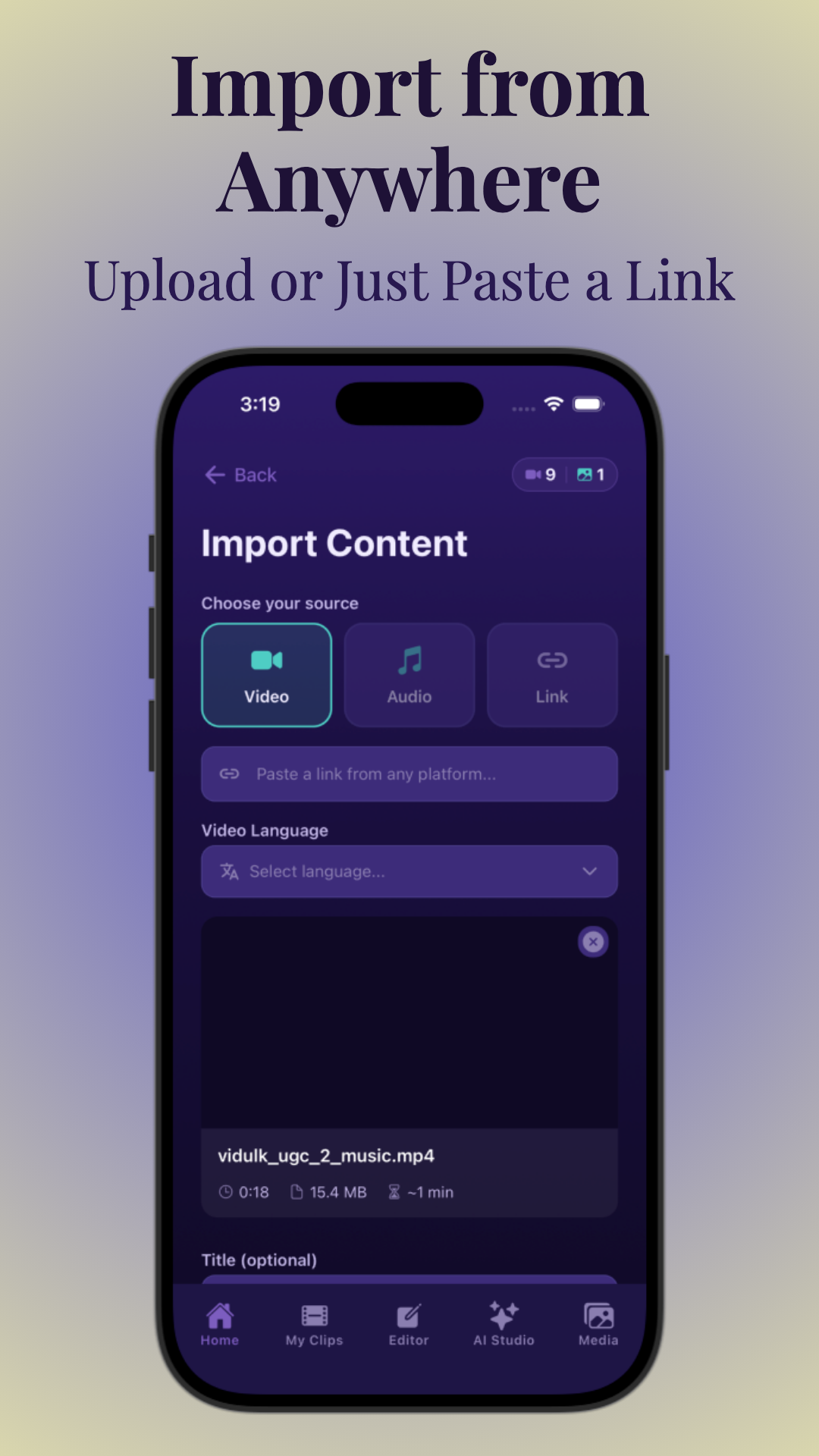
Tools like Vidulk make this process seamless, letting you generate shorts by simply pasting a link—no manual editing required. This is ideal for repurposing podcasts, interviews, or livestreams into multiple shareable clips. For example, a 45-minute podcast episode can yield 15+ shorts, each targeting a different question, story, or insight shared by the guest.
Batch Generation: 10–30+ Shorts with One Click
- AI tools can split a single 30–60 minute video into dozens of shorts in minutes. For instance, Vidulk users often extract 12–25 usable shorts from a single webinar or interview without manual review.
- You can review, edit, and select the best clips before publishing. This curation step ensures only the most relevant or engaging moments make it to your feed.
- Some tools let you set parameters for length, topics, and speaker focus. For example, you might specify that all shorts should be 30–60 seconds and prioritize segments where a certain guest is speaking.
Learn more about the step-by-step process in our companion post: How to Post More Content and Grow: The Ultimate Repurposing Guide. If you're interested in a complete workflow for turning long videos into short clips, see our complete AI workflow for turning long videos into short clips.
Direct YouTube Features: Remix and Shorts Creation
YouTube’s mobile app offers a built-in “Remix” feature, letting you create Shorts directly from any public video. This is handy for quick edits but lacks the advanced AI detection, batch processing, and captioning features found in dedicated video to shorts converters. The Remix feature is most useful for basic trimming and sharing, but if you want to surface the most viral moments or create branded, captioned clips at scale, external apps like Vidulk or Opus Clip are far superior.
Additionally, direct URL-based workflows support faster repurposing for brands managing large video libraries. Instead of downloading and uploading files, managers can paste links and process dozens of videos per day, accelerating campaign launches and seasonal promotions.
Section 4: Editing Features—Captions, Resizing, Vertical Framing and More
AI-Generated Captions and Text Overlays
Effective short-form content relies on eye-catching captions and subtitles. Most viewers watch with sound off, making text overlays essential for engagement:
- Auto-captioning: AI transcribes speech and syncs text to audio. This not only improves accessibility for hearing-impaired viewers but also boosts watch time, since key messages are never missed.
- Customization: Change font, color, size, and animation styles. This allows brands to match their visual identity, and creators to maintain a consistent look across all shorts. For example, you can choose bold fonts for energetic moments or subtle styles for educational content.
- Karaoke-style overlays: Highlight words as they’re spoken for extra impact. This is especially useful for music, tutorials, or any content where following along in real time is important.
Vidulk and Klap both offer robust captioning tools, with Vidulk allowing in-app editing and style selection. For more advanced intro generation and branding, see AI Video Tools for Creators: The Ultimate Guide to Clipping, Captions & More.
Automatic Vertical Reframing and Resizing
- Smart cropping: AI keeps the main speaker or action centered in the frame. This involves tracking facial recognition or motion detection to avoid awkward framing, even if the original footage is wide-angle or multi-speaker.
- Aspect ratio conversion: Instantly converts 16:9 (landscape) to 9:16 (vertical). The AI decides which section of the frame deserves focus—sometimes zooming in, sometimes panning, depending on the action or dialogue.
- Manual repositioning: Drag or zoom to focus on specific subjects. This is helpful for panel discussions, interviews with multiple guests, or sports events where the action shifts rapidly.
This is crucial for podcast and interview content, where speakers may shift on screen. CapCut, Vidulk, and Choppity all provide these features, but the precision of AI tracking varies. Some tools let you lock onto a face, while others detect the loudest speaker or the most animated gestures.
Manual Editing: Trimming, Splitting, and Fine-Tuning
- Even with AI automation, you can split, trim, or merge clips for custom edits. This hybrid workflow is ideal for creators who want to polish AI-generated clips or inject their own creative flair.
- Adjust cut points, add stickers or effects, and preview before publishing. For example, you can trim out filler words, add sound effects, or overlay a call-to-action at the end of a short.
- Some tools (Vidulk, CapCut) allow exporting for further editing in apps like Premiere or Final Cut. This flexibility is essential for creators producing high-end branded content or working with a post-production team.
Combining automation with manual refinement ensures that your shorts are both efficient to produce and creatively unique. Many top creators use AI to generate the first draft, then fine-tune the best clips to match their specific audience or campaign goals.
Section 5: Virality Scoring, Highlight Detection, and Batch Generation
How AI Detects Viral Moments
Modern video to shorts converters use machine learning to analyze:
- Speech dynamics: Tone, volume, and excitement in the audio track. For example, moments where a speaker’s voice rises or they tell an emphatic story are often flagged as viral-worthy.
- Engagement cues: Laughter, applause, or dramatic pauses. AI models trained on hundreds of viral shorts recognize the audio fingerprints of audience reactions, which typically indicate high engagement.
- Visual cues: Gestures, facial expressions, scene changes. Rapid movement, surprise reactions, or cutaway shots signal to AI that something noteworthy is happening.
AI models are trained on thousands of viral clips, learning what makes a moment "share-worthy." Vidulk and Opus Clip both offer virality scoring, ranking each generated short by its predicted engagement potential. Scores help creators prioritize which shorts to publish, focusing on those with the greatest potential for reach and shares.
For example, a 60-minute interview might yield 20 clips, with 4-5 ranked as top virality candidates. These are prime for posting during peak engagement hours or using as paid promotion assets.
Batch Generation: Scaling Your Shorts Output
- 10–30+ clips per upload: Set the number of shorts you want generated. Some platforms let you specify a max/min duration for each short, ensuring content is tightly focused and platform-optimized.
- Auto-topic clustering: Group clips by topic, speaker, or sentiment. This is especially helpful for podcasts or educational videos, where you might want to organize shorts by theme (e.g., "marketing tips," "funny moments," or "guest introductions").
- Review and select: Quickly discard or approve clips before posting. Efficient review interfaces let you preview all generated shorts, select favorites, and even merge or split segments as needed.
This batch approach is ideal for podcasts, interviews, and lectures—turning an hour-long recording into a week’s worth of content. For more on the AI behind highlight detection, see AI Video Clip Generator: Transform Long Videos with AI. For tips on identifying the best moments to clip and turn long videos into viral shorts, check out our dedicated guide.
Batch processing is particularly valuable for agencies and social media managers, who may need to deliver content calendars for multiple clients. With AI, a single manager can generate and schedule hundreds of shorts per week, something that would be prohibitively time-consuming with manual editing alone.
Manual Highlight Selection
- Some creators prefer to manually flag highlights or set start/end points. This is useful for storytelling, ensuring context and punchlines aren’t lost.
- Tools like CapCut and Vidulk allow you to combine AI picks with your own choices. You might override the AI if you know your audience responds best to certain jokes, stories, or themes.
- This hybrid workflow ensures you never miss a favorite soundbite or quote. Manual intervention is also key for sensitive topics, allowing you to avoid out-of-context or controversial clips.
Ultimately, the best results come from blending AI’s speed and data-driven insight with your unique voice and understanding of your audience.
Section 6: Free vs. Paid Plans, Watermarks, and Direct Publishing
Understanding Free Plans: Watermarks and Limits
- Watermarks: Most free tools add a logo or branding to exported shorts. For example, free exports from Vidulk or Opus Clip include a small logo, which may be distracting for branded content.
- Upload limits: Daily or monthly caps on video uploads and clip exports. Free tiers typically allow 2-5 video uploads per month, or a set number of shorts per week. Heavy users will quickly outgrow these limits.
- Feature access: Some editing and AI features may be restricted. For instance, access to advanced caption customization, batch generation, or direct publishing integrations may be locked behind paid plans.
Vidulk offers a free tier with watermarking and paid upgrades for watermark-free, higher volume exports. Opus Clip and Klap have similar models. Some tools also offer trial credits, letting you test premium features before subscribing.
Paid Plans: Unlocking Advanced Features
- Remove watermarks for professional, brand-safe output. This is crucial for creators building a consistent, recognizable presence or delivering client work.
- Higher batch limits—generate more shorts per video. Paid plans may allow unlimited uploads or 100+ shorts per month, supporting daily publishing schedules.
- Direct publishing to TikTok, Instagram, and YouTube. This saves time and reduces friction, especially for teams managing multiple social accounts.
- Priority AI processing for faster turnaround. Premium users often receive faster video analysis and export, critical for news, trends, or real-time marketing.
For heavy users, paid plans quickly pay for themselves—especially if you’re producing content at scale for clients or multiple channels. For example, an agency producing 200 shorts per month for five clients would save dozens of hours and ensure brand consistency with a premium subscription.
Direct Publishing and Integrations
- One-click upload to TikTok, Reels, and Shorts from within the app. Vidulk’s mobile-first workflow means you can process and publish a short in under 2 minutes, from anywhere.
- Social integrations for scheduling and analytics. Some apps connect with tools like Buffer, Hootsuite, or native platform APIs to automate posting and track performance.
- Export options—download for manual upload or cross-posting. This gives you flexibility for platforms not directly supported or for archiving shorts for future campaigns.
Vidulk streamlines this flow, letting you go from long video to published short in just a few taps. For teams building integrated video solutions, see How to Integrate Video Chat API for Seamless Content Creation.
As short-form video continues to dominate social feeds, investing in the right workflow and plan ensures you stay ahead of trends, maximize content ROI, and maintain a consistent, professional presence across all major platforms.
Conclusion
AI-powered video to shorts converters have revolutionized content creation. Whether you’re a podcaster, YouTuber, or brand, these tools let you repurpose long-form video into dozens of engaging, vertical shorts—optimized for TikTok, Instagram, and YouTube—in minutes.
Choose your tool based on workflow, output quality, editing flexibility, and plan features. Free options are great for testing, but serious creators will appreciate watermark-free exports, higher batch limits, and direct publishing offered by paid plans. To experience the fastest, mobile-first workflow, try Vidulk and see how easy it is to turn one video into a week’s worth of viral content.
The future of video is short, fast, and AI-powered. By leveraging the latest tools and optimizing your workflow, you can engage audiences, grow your brand, and keep pace with the ever-changing social landscape—no matter your experience level or team size.
FAQ
Q: What is the best free AI video to shorts converter without watermarks?
A:
Most free AI converters add watermarks, but Vidulk and Opus Clip offer limited watermark-free exports on trial or introductory plans. For consistent, watermark-free output, a paid plan is usually required.
Q: How do I turn a YouTube video into multiple shorts automatically?
A:
Paste your YouTube video link into an AI video to shorts converter like Vidulk, Opus Clip, or Klap. The tool will automatically detect highlights, split them into short clips, and generate captions and vertical formatting—ready for download or direct posting.
Q: Which tool generates the most viral clips from long videos?
A:
Vidulk and Opus Clip both use advanced AI models for highlight detection and "virality scoring," helping you surface the most engaging moments. Try both to see which best fits your content style.
Q: Can I convert videos to shorts directly on YouTube without external tools?
A:
Yes, YouTube’s mobile app offers a Remix feature for creating Shorts from public videos. However, this feature lacks AI highlight detection, batch generation, and captioning found in dedicated converters.
Q: What are the best converters for podcasts and interviews into shorts?
A:
Vidulk, Choppity, and Klap are all strong options for podcasts and interviews, offering speech-based highlight detection, automatic captioning, and vertical reframing for speaker-focused clips. If you want a detailed workflow for podcast content, check out our ultimate workflow for turning interviews into viral podcast shorts or see our step-by-step guide to clipping podcasts into shorts.
Q: How long does it take AI to process a 10-minute video into shorts?
A:
Most AI tools—including Vidulk—can analyze and generate 5–15 shorts from a 10-minute video in under 5 minutes, depending on clip volume, video complexity, and server load.



